Real Estate Dashboard Templates (2026): Realtor and Property Management
Compare 7 real estate dashboard templates for 2026: realtor CRMs, Next.js admin panels and property management apps for listings, leads, viewings and rent.
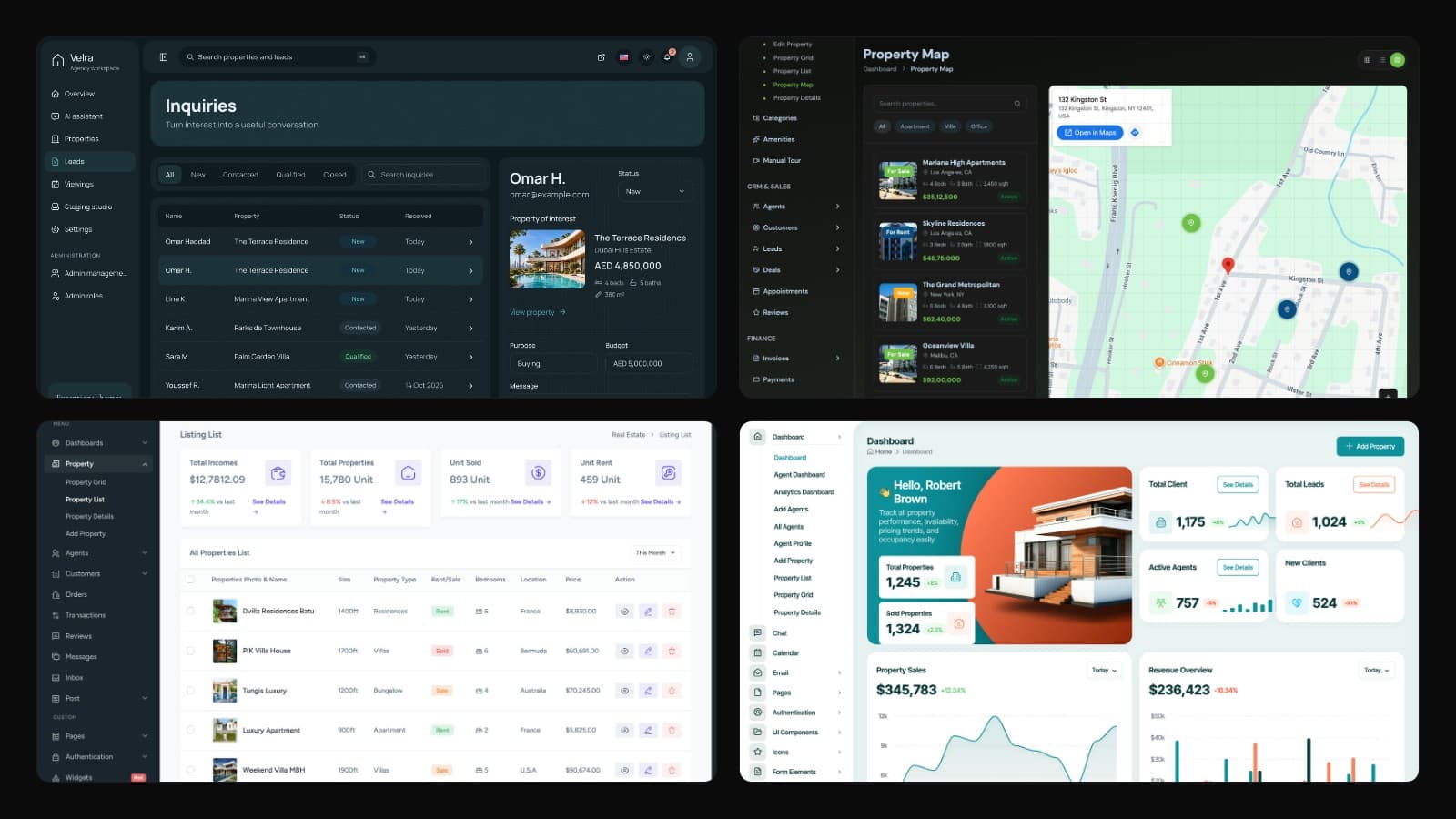
This is a buyer's list of real estate dashboard templates for 2026, written for developers, agencies and founders who need the back office of a property business: the screens where listings are edited, inquiries are answered, viewings are confirmed and, for rentals, tenants and rent are tracked. It covers premium templates from ThemeForest and independent stores, a large shadcn/ui kit, and an open-source property management app you host yourself.
The first decision is not the design. It is which business the dashboard serves. A realtor dashboard is built around selling and letting: listings, leads, viewings, deals and an agent's pipeline. A property management dashboard is built around what happens after the lease is signed: tenants, rent due and paid, receipts, leases and maintenance. Most templates cover the first and only a few touch the second, so the table below says which back-office jobs each one actually covers. Every demo was opened and every price was read from the product page in November 2026.
If you are planning the public side as well (the property search, listing pages and inquiry forms a visitor sees), our guide on how to build a real estate agency website in Next.js covers that part. This post stays in the back office.
| Template | Best for | Stack | Back office covered | Backend | Price |
|---|---|---|---|---|---|
| Velra Agency Dashboard (Aniq UI) | Agencies that need a working back office | Next.js 16, Tailwind CSS 4 | Listings, inquiries, viewings, map, AI assistant, roles | Own NestJS API (sold as Backend API or in Full Stack) | $99, Full Stack $179 |
| CRMS Property CRM | Realtor CRM screens | HTML, Tailwind demo (Bootstrap per listing) | Listings, map, leads, deals, appointments, invoices, payments, reports | None (front end only) | $35 |
| Lahomes | A low-cost Next.js admin UI | Next.js 16, Bootstrap 5.3.8 | Listings, agents, customers, orders, transactions, reviews, messages | None stated | $21 |
| Shadcn UI Kit Real Estate | shadcn/ui and Tailwind teams | Next.js 16, React 19, Tailwind CSS 4 | KPI dashboard, listings, detail page, filters | None stated | Pro from $79 (sale) |
| Homez | Listings portals with user accounts | Next.js 16, Bootstrap 5 | My properties, add property, messages, favorites, saved searches, reviews, packages | JSON data, no backend | $24 |
| MicroRealEstate | Landlords managing rentals | Next.js 15.5, React 19, MongoDB | Properties, tenants, leases, rent payments, receipts, tenant portal | Included (self-hosted with Docker) | Free up to 5 units (SUL licence) |
| UrbanHub | A cheap HTML property admin | HTML, Bootstrap 5.3, SCSS | Property and agent dashboards, listings, bookings, calendar | None | $14 |
Best Real Estate Dashboard Templates in 2026
1. Velra Real Estate Agency Dashboard by Aniq UI
Best for: agencies, brokers and developers who want a back office that already works end to end (listings, inquiries and viewings saved in a real database), with the public website and the API from the same codebase, in English and Arabic.
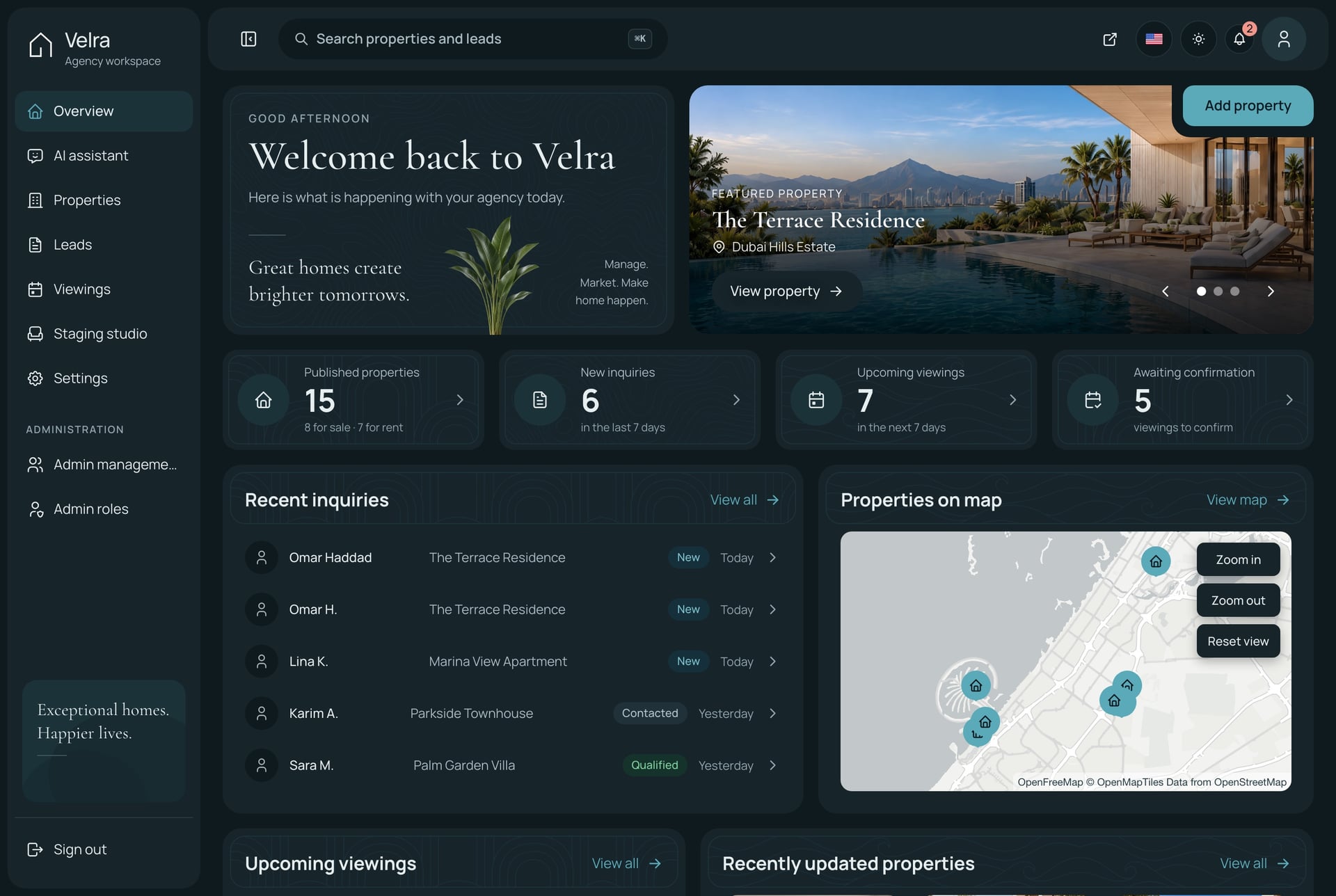
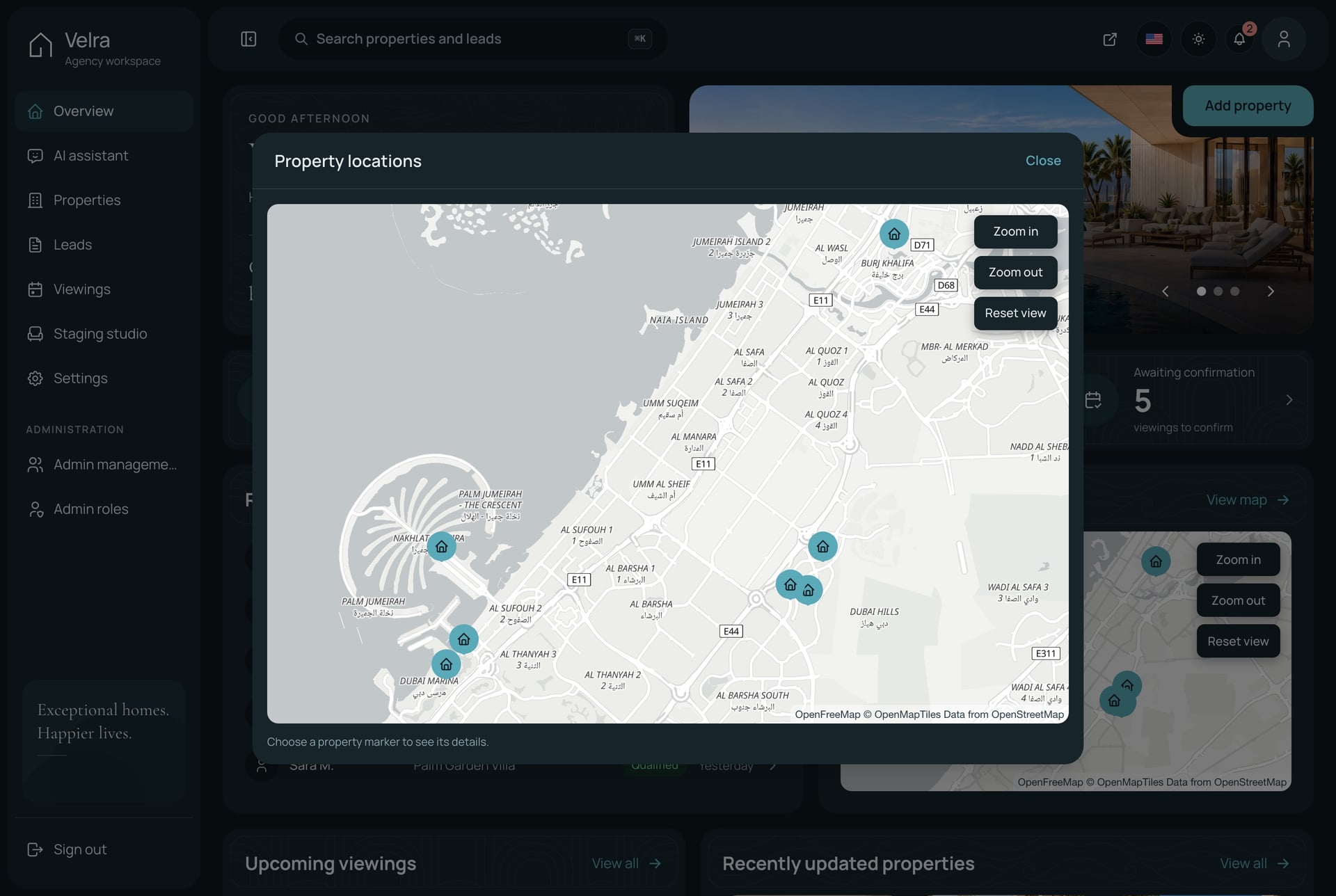
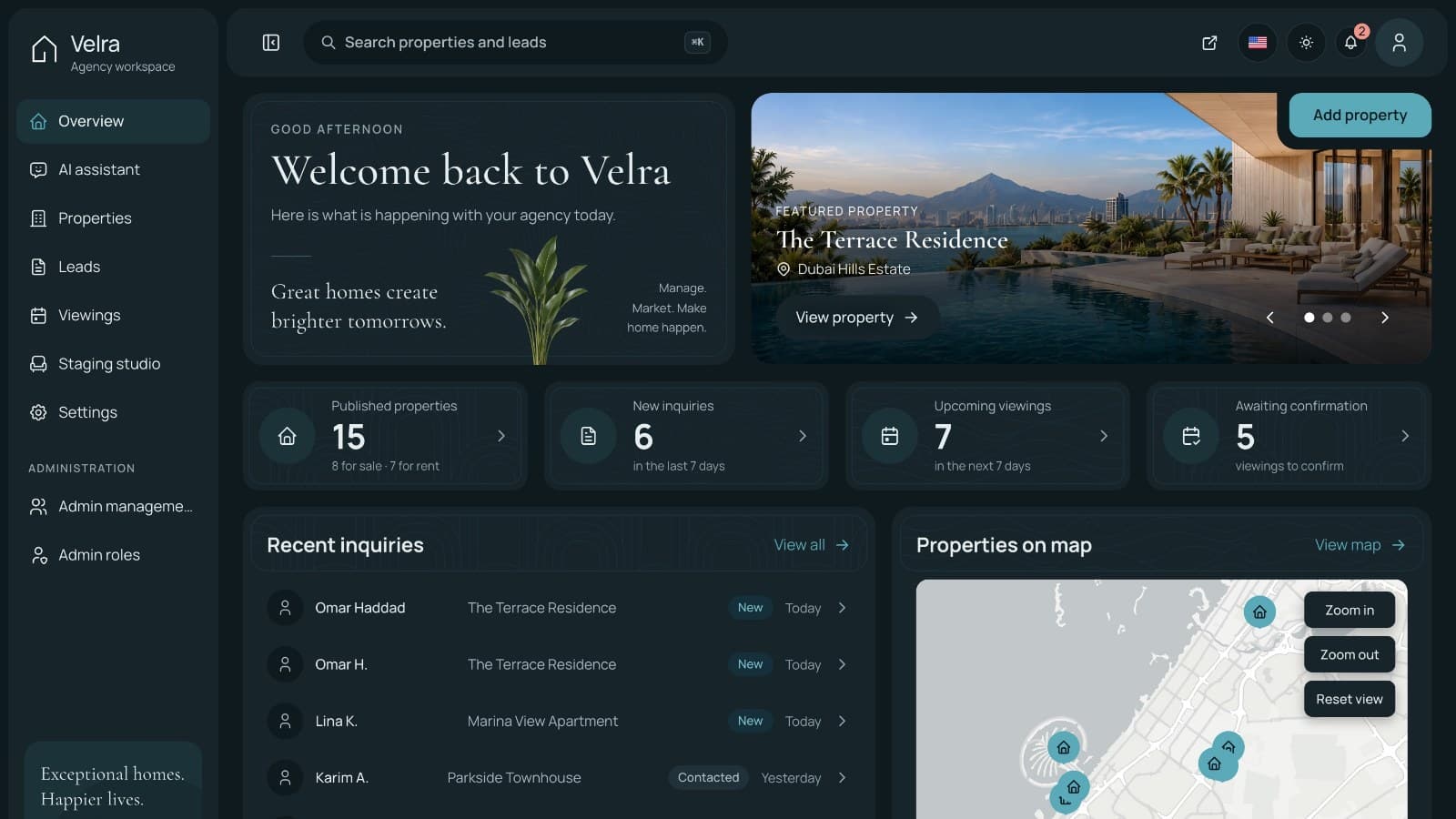
The Next.js real estate agency dashboard template is the back office of Velra, a full real estate product sold by Aniq UI. The overview opens on the agency's day: published properties split into sale and rent, new inquiries from the last seven days, upcoming viewings, viewings waiting for confirmation, the latest inquiries and every listing on a map.
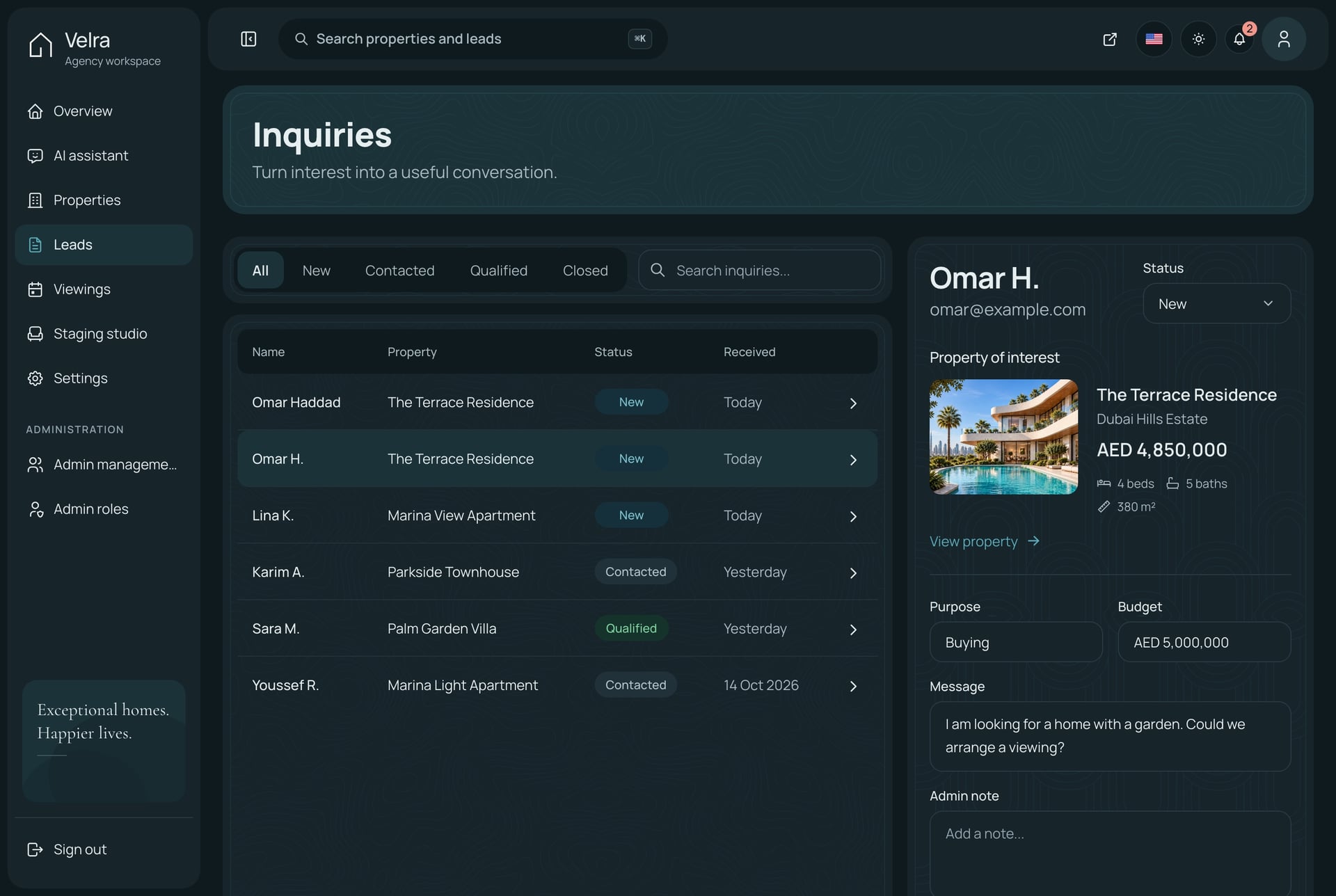
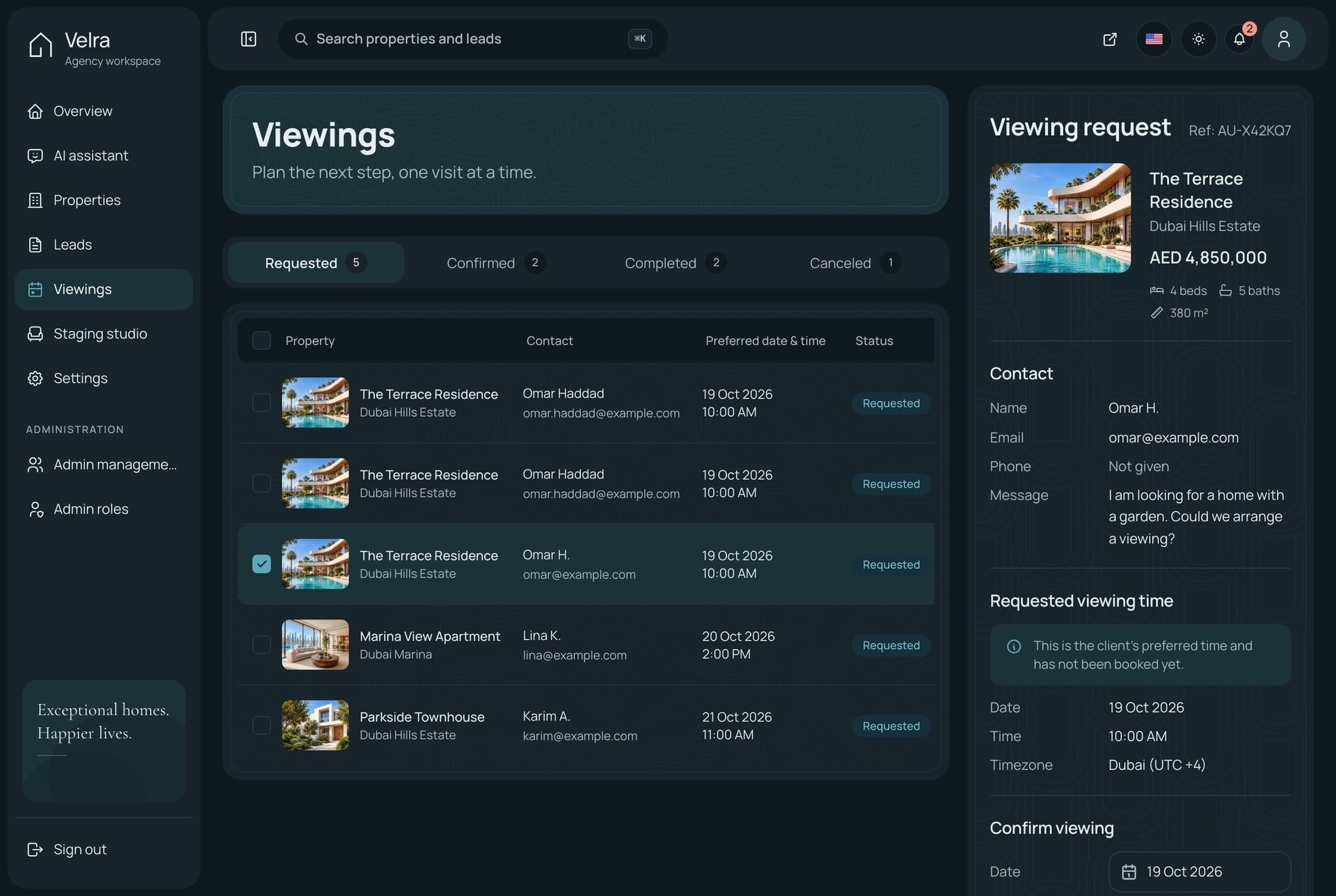
Each inquiry opens in a side panel with the visitor's message, the property it concerns, the purpose and budget they gave, and a field for the agent's notes. Its status moves through new, contacted, qualified and closed. A viewing request arrives with the visitor's preferred date and time and stays "requested" until someone confirms it, so nobody is promised a slot that was never checked. Confirming, completing or cancelling a viewing is one action.
The property editor holds the title and description in English and Arabic, photos in display order with one cover, the location and SEO fields, and a draft, published and archived workflow. Each listing keeps its own coordinates: you find a place by name or drop the pin, and choose whether the website shows the exact spot or only the area.
- Overview, property list with status tabs, search and filters, and a property editor in two languages
- Inquiries with status, search, notes and a notification the moment one arrives
- Viewings to confirm, complete or cancel, with a count on every status tab
- Every property on one map, and a per-listing choice between exact and approximate location
- An AI assistant that answers from the agency's own data through MCP tools and draws a chart for trend questions, with Google Gemini, OpenAI or DeepSeek on your own key
- An AI staging studio that furnishes a photo of an empty room with Gemini's image editor, with approval before anything is published
- Admins, roles and permissions, with menu items hidden from roles that lack them
Stack: Next.js 16 App Router, React 19, TypeScript, Tailwind CSS 4, TanStack Query and next-intl on the dashboard. The API is NestJS 11 with TypeORM, JWT auth, Socket.io notifications and a one-command seeder.
Price (checked November 2026): the agency dashboard is $99, the public website $79 and the backend API $99. The full Velra real estate template with all three is $179, less than the $277 the parts cost separately. It is a one-time payment with free updates, the licence covers unlimited commercial projects including client work, and Velra is also one of the ten templates in the Aniq UI Next.js templates bundle.
Good to know: the dashboard reads its data from the Velra API, so on its own it needs the Backend API, and most buyers will want Full Stack. It is an agency tool, not a property management system: there are no tenant records, rent ledgers, leases or maintenance tickets, and viewings are a list rather than a calendar grid. The AI features run on your own provider keys. In the live dashboard demo the sign-in page fills in a demo account, the data is rebuilt every day, and you can open the Velra website demo to send a test inquiry and watch it arrive.
2. CRMS Property CRM by Dreams Technologies
Best for: teams building a realtor CRM who want the widest set of ready screens (pipeline, deals, appointments, invoices) and will write the backend themselves.
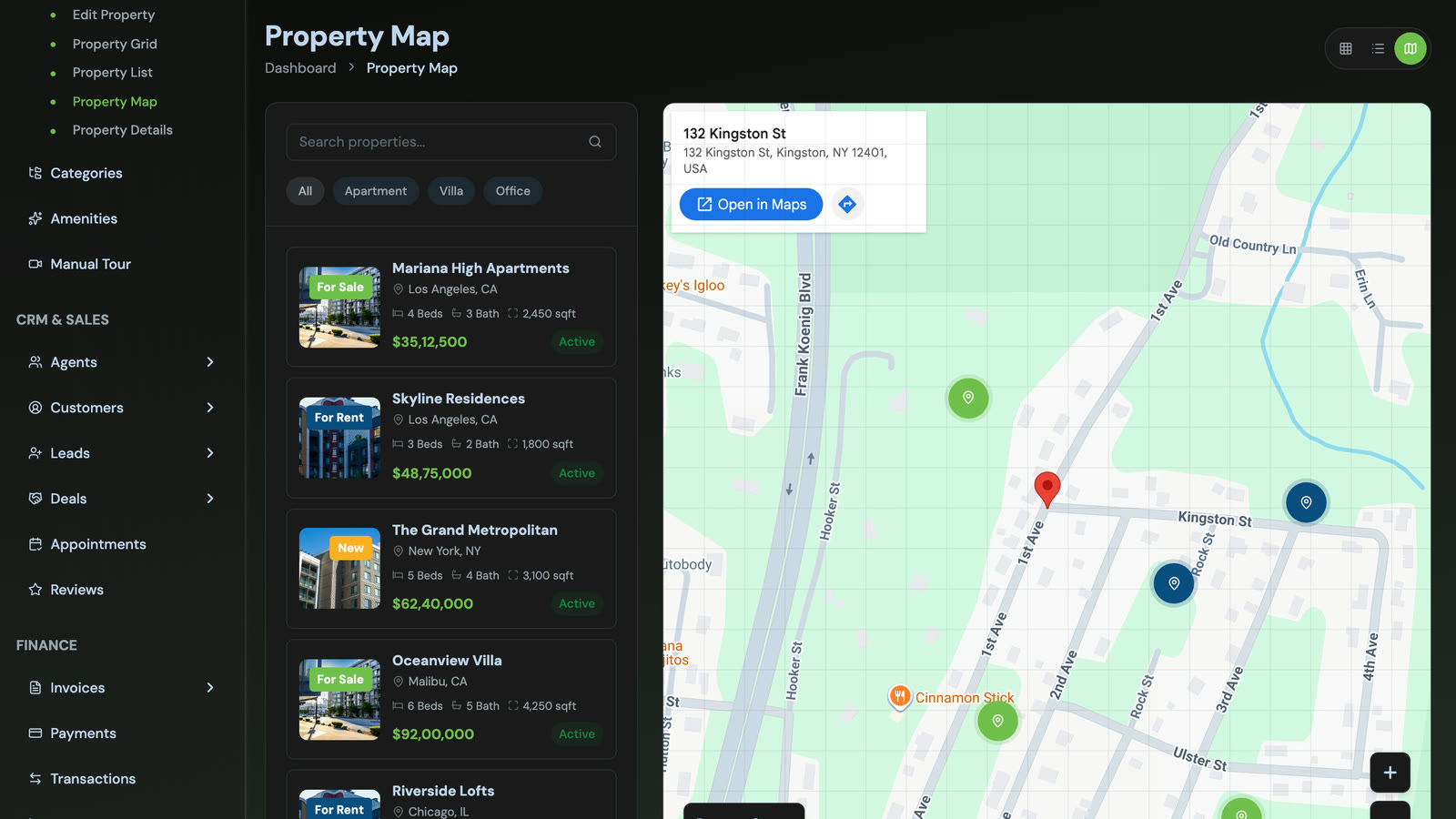
CRMS is a long-running ThemeForest CRM template that now includes a Property CRM alongside its sales CRM. The property CRM demo opens on revenue split into sales and rentals, property and active listing counts, and featured listings. Its menu covers the whole realtor workflow: properties in grid, list and map views, categories, amenities, a manual tour page, agents, customers, leads, deals, appointments, reviews, invoices, payments, transactions and reports.
The listing goes further than the demo and names 31 Property CRM modules, including rental management, tenant, owner, buyer and seller management, enquiries, visits, open house management, an opportunity pipeline and contracts and agreements. Of every option here, it is the one whose screens come closest to covering both a sales team and a rentals desk.
- Leads with status and priority, deals and a property sales pipeline
- Appointments for viewings, plus calendar, chat, email, to-do and file manager apps
- Invoices, payments and transactions for the finance side
- Property map view with filters by type
- A dark theme and a separate set of non-real-estate CRM screens in the same purchase
Stack: HTML5, CSS3, SCSS and JavaScript. The listing says Bootstrap 5 with jQuery, while the property CRM demo is labelled as a Tailwind build. The wider CRMS demo also links React and Angular versions of its sales CRM. No Next.js version is mentioned.
Price (checked November 2026): $35 for a Regular licence (one end product that users are not charged for) and $499 for an Extended licence. It has 921 sales and a 4.82 rating from 28 reviews, and was last updated on 23 October 2026.
Good to know: the listing says plainly that it is front end only, with no backend, API or database, so every lead, deal and payment screen needs your own server behind it. Several of the rental and tenant modules named on the listing were not in the Tailwind property demo, so confirm they are in the download for the version you want.
3. Lahomes by Techzaa
Best for: developers who want a real estate admin UI on Next.js 16 for the price of a lunch, and teams that may need the same design on another stack later.
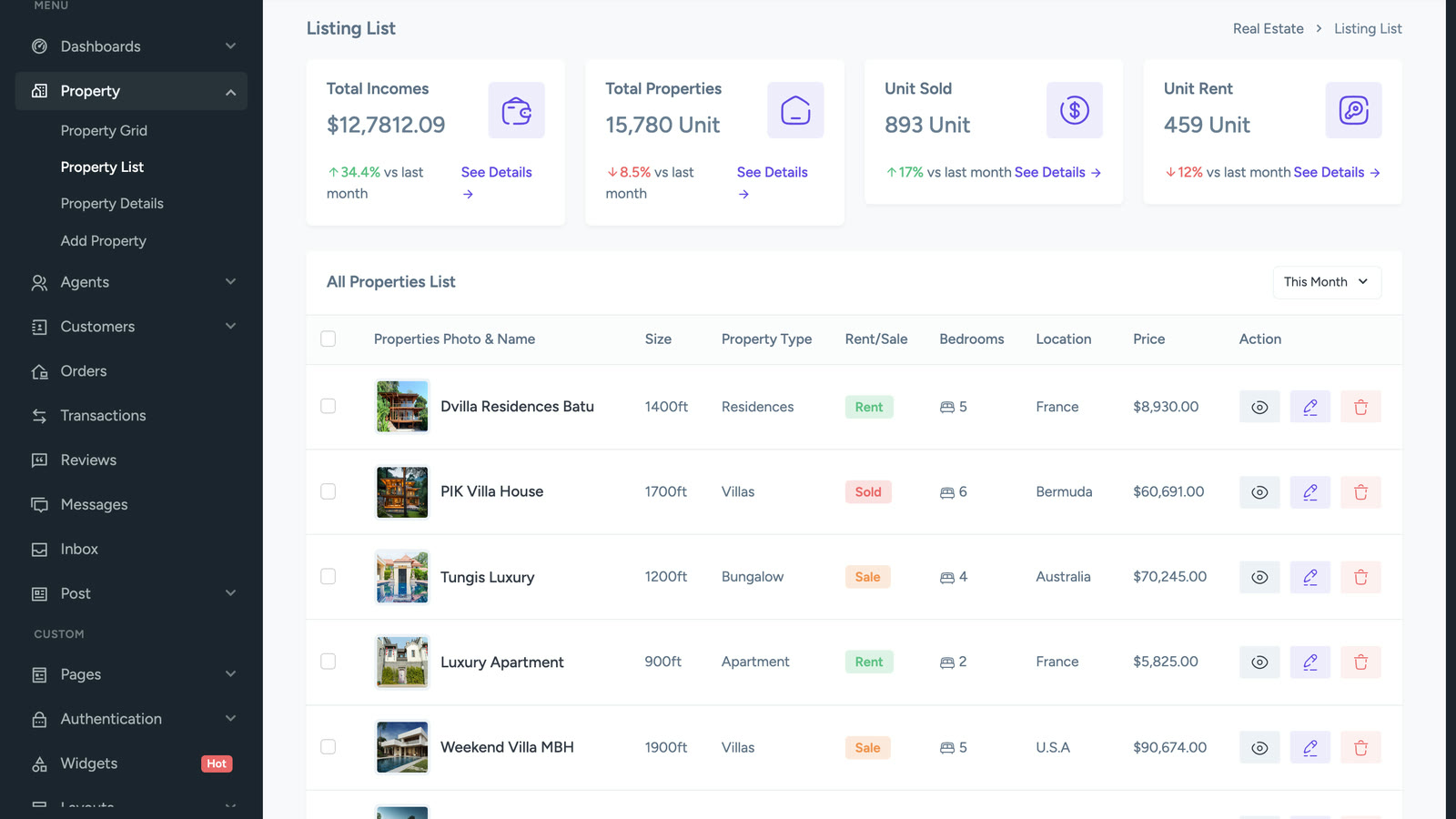
Lahomes is a real estate management admin template built on Next.js 16 and Bootstrap 5.3.8. It ships three dashboards (analytics, agent and customer), property pages in grid, list, details and add views, agent and customer sections, orders, transactions, reviews, messages and an inbox, plus a calendar page and Google and vector map pages among its 85+ pages.
The same design is sold as separate ThemeForest items for Laravel, Angular, React, Vue 3, Django, Flask, PHP, Spring Boot, ASP.NET Core and more, which is useful if an agency builds for clients on different stacks.
- Analytics, agent and customer dashboards with sales and income charts
- Property grid with filters for location, price range, type and bedrooms
- Orders and transactions pages for the money side
- Light and dark modes, with RTL and LTR layouts
- Form validation and wizard pages for long property forms
Stack: Next.js 16, React, TypeScript, Bootstrap 5.3.8, SCSS.
Price (checked November 2026): $21 for a Regular licence and $499 for an Extended licence. It has 37 sales, no published rating yet, and was last updated on 13 December 2025.
Good to know: the Next.js preview redirects to a sign-in page before showing the dashboard, so the screenshot here comes from the open HTML preview of the same design. No backend is stated. The "orders" and "customers" pages read like a shop more than a realtor CRM, and there are no lead, viewing or tenant workflows, so plan to rename and rewire them.
4. Shadcn UI Kit Real Estate Dashboard
Best for: teams already on shadcn/ui and Tailwind who want a real estate dashboard as one part of a much larger kit of dashboards, blocks and components.
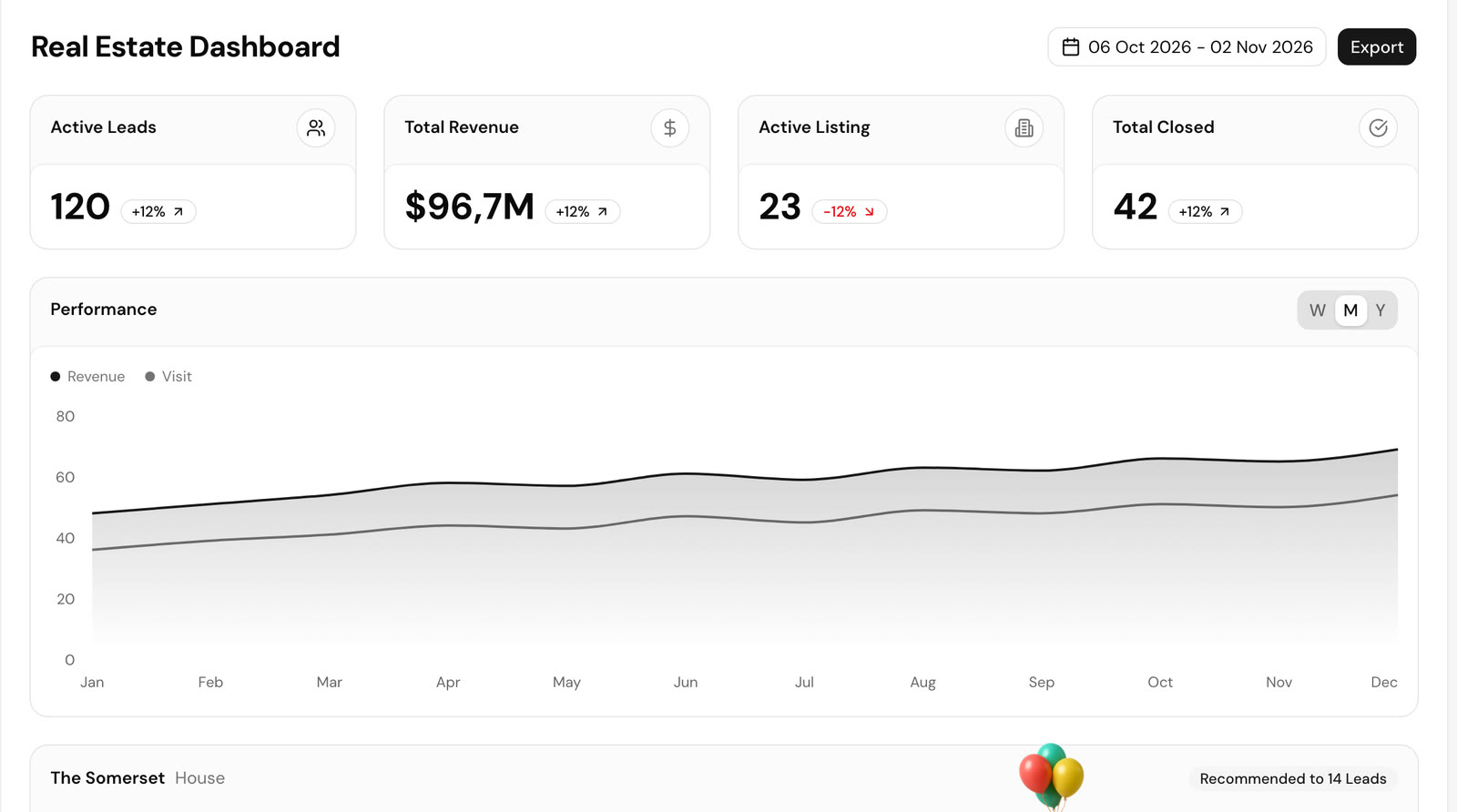
Shadcn UI Kit is an independent store selling 16 admin dashboards, web apps, website templates and 550+ blocks built on Next.js 16, React 19, Tailwind CSS 4 and TypeScript. Its real estate section has a dashboard, a listings page, a property detail page and a filter page. The dashboard tracks active leads, revenue, active listings and closed deals, with a revenue and visits chart and a featured property card that shows how many leads it was recommended to.
- A clean shadcn/ui look that matches the rest of a shadcn codebase
- Light and dark themes with a theme generator
- Listings, detail and filter pages for the property side
- Every other dashboard in the kit (CRM, sales, hotel, project management, file manager) in the same purchase
- Figma file and an MCP server in the paid plans
Stack: Next.js 16, React 19, TypeScript, Tailwind CSS 4, shadcn/ui.
Price (checked November 2026): the Pro plan is $79 one-time during a sale (listed at $129), for one user and unlimited projects. Team is $199 for ten users and Enterprise is $499. There is a free Starter tier with limited content.
Good to know: the real estate part is four screens inside a general kit, not a product built around an agency's workflow. There are no inquiry, viewing or tenant screens, no backend, and RTL is not mentioned. The kit's CRM dashboard can fill some of the lead-handling gap.
5. Homez by ib-themes
Best for: property portals where owners and agents sign in to manage their own listings, and buyers who mainly need the public site with a member dashboard.
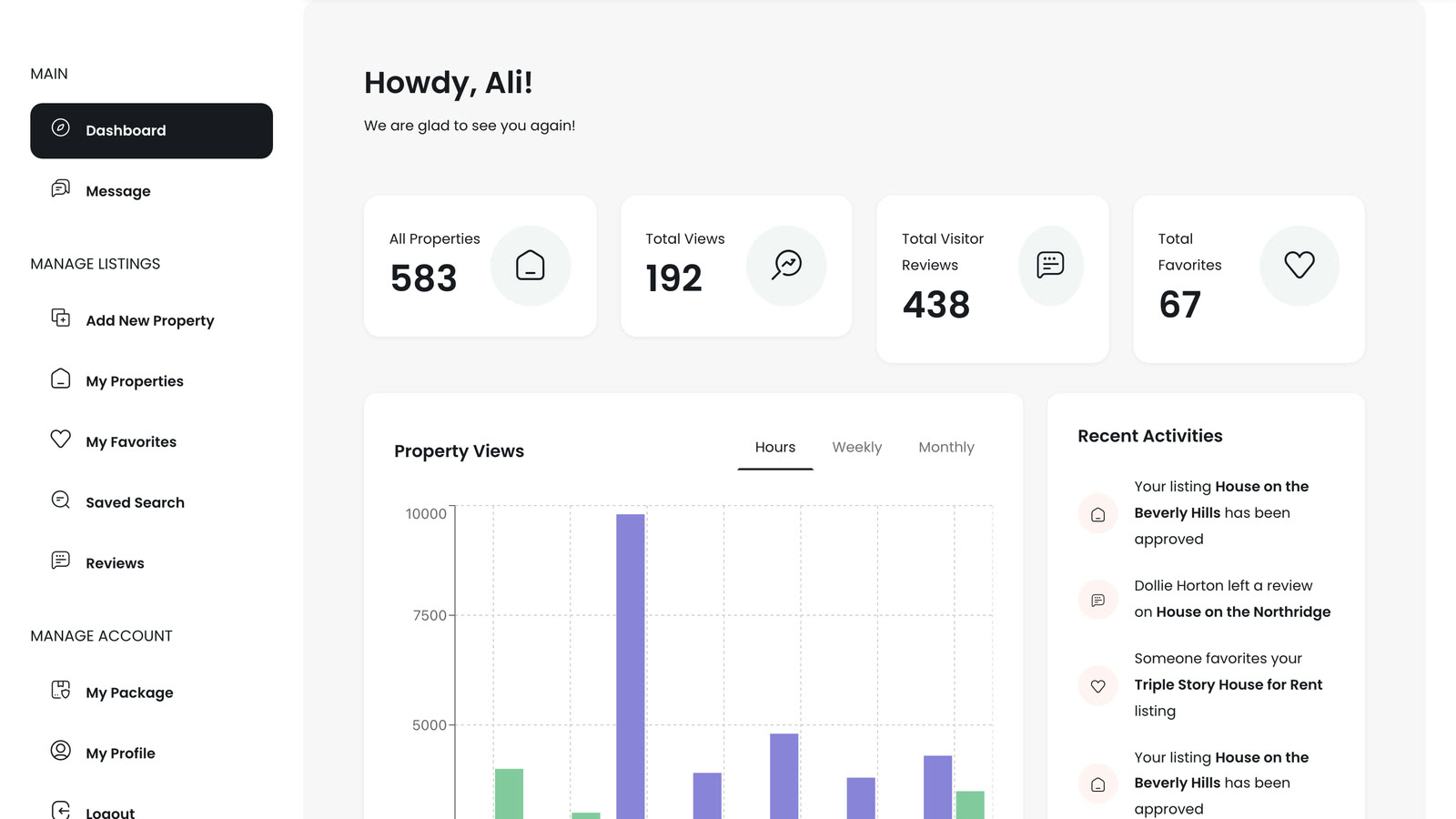
Homez is one of the best-selling Next.js real estate templates on ThemeForest. It is mostly a listings website (10 home layouts, 15+ grid, list and map pages and 10 property page styles), with a member dashboard of 9+ pages: an overview with listing, view, review and favorite counts and a property views chart, messages, add new property, my properties with publish status, favorites, saved searches, reviews, packages and profile.
- Member dashboard where a listing moves through pending, published and processing states
- Saved searches and favorites for buyers
- Packages page for portals that charge for listings
- Map pages on the public side
- Data in JSON files, ready to swap for an API
Stack: Next.js 16 with the App Router, React, Bootstrap 5, Swiper.
Price (checked November 2026): $24 for a Regular licence and $499 for an Extended licence. It has 750 sales, a 4.91 rating from 35 reviews, and was last updated on 15 April 2026.
Good to know: this dashboard belongs to a listing owner, not to an agency's staff. There is no lead pipeline, viewing workflow, team roles or tenant management. Demo images are not included in the download and there is no backend. The dashboard demo is public. The same author's FindHouse ($24, 616 sales) follows the same pattern.
6. MicroRealEstate
Best for: landlords and small rental businesses who need the property management side (tenants, leases, rent, receipts), and developers who want to read how that side is built.
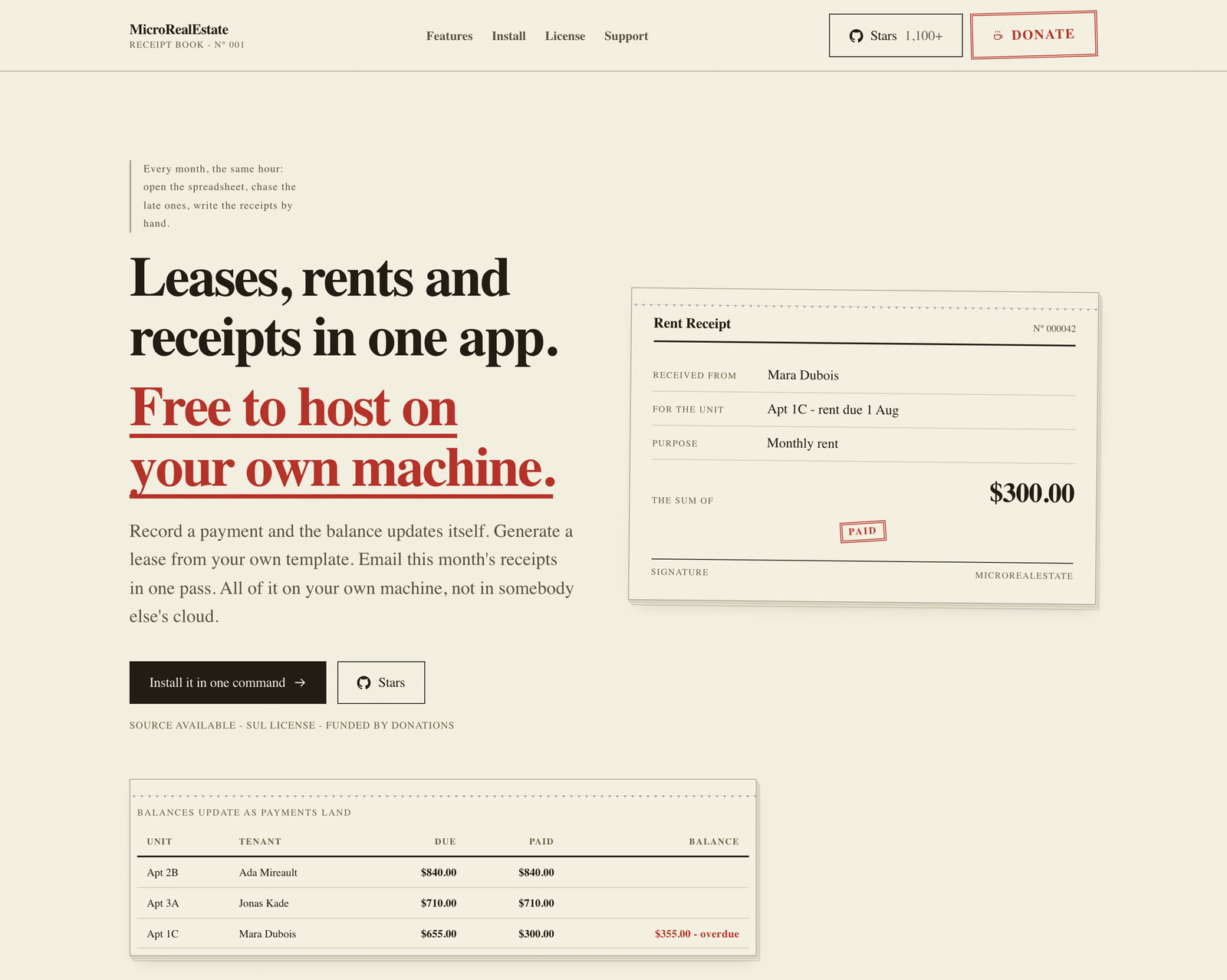
MicroRealEstate is a self-hosted property management app for landlords, and the only option in this list that tracks rent. It stores properties and tenants, generates leases from your own templates, records rent payments and recalculates balances so overdue amounts stand out, and sends rent notices and receipts by email in one pass. Tenants get their own portal to check payments and receipts, and a second person can be invited to work on the same records.
- Properties, tenants and lease contracts in one place
- Rent tracking with balances and overdue amounts
- Lease templates and custom documents
- Bulk email for notices and receipts
- A tenant portal and collaborator accounts
- Landlord app in English, French, German, Spanish and Brazilian Portuguese
Stack: Next.js 15.5, React 19, TypeScript, Tailwind CSS 4, Node.js services and MongoDB, installed with Docker Compose or a one-line install script. It has about 1,200 GitHub stars.
Price (checked November 2026): free to use for a private landlord with up to 5 rental units and no commercial activity. The main branch moved from MIT to the Sustainable Use License (SUL) v2.0 in February 2026: commercial use, a hosted service or a larger portfolio needs a separate licence from the author. Code up to December 2025 remains MIT.
Good to know: it is an application, not a template to restyle and resell, and its licence matters if you build for clients. There is no public demo, so you run it locally to see it. It has no listings, leads or viewings for selling, and maintenance requests are not among its listed features.
7. UrbanHub by layoutdrop
Best for: the lowest-cost property admin UI, for teams that will put it on any backend and do not need React.
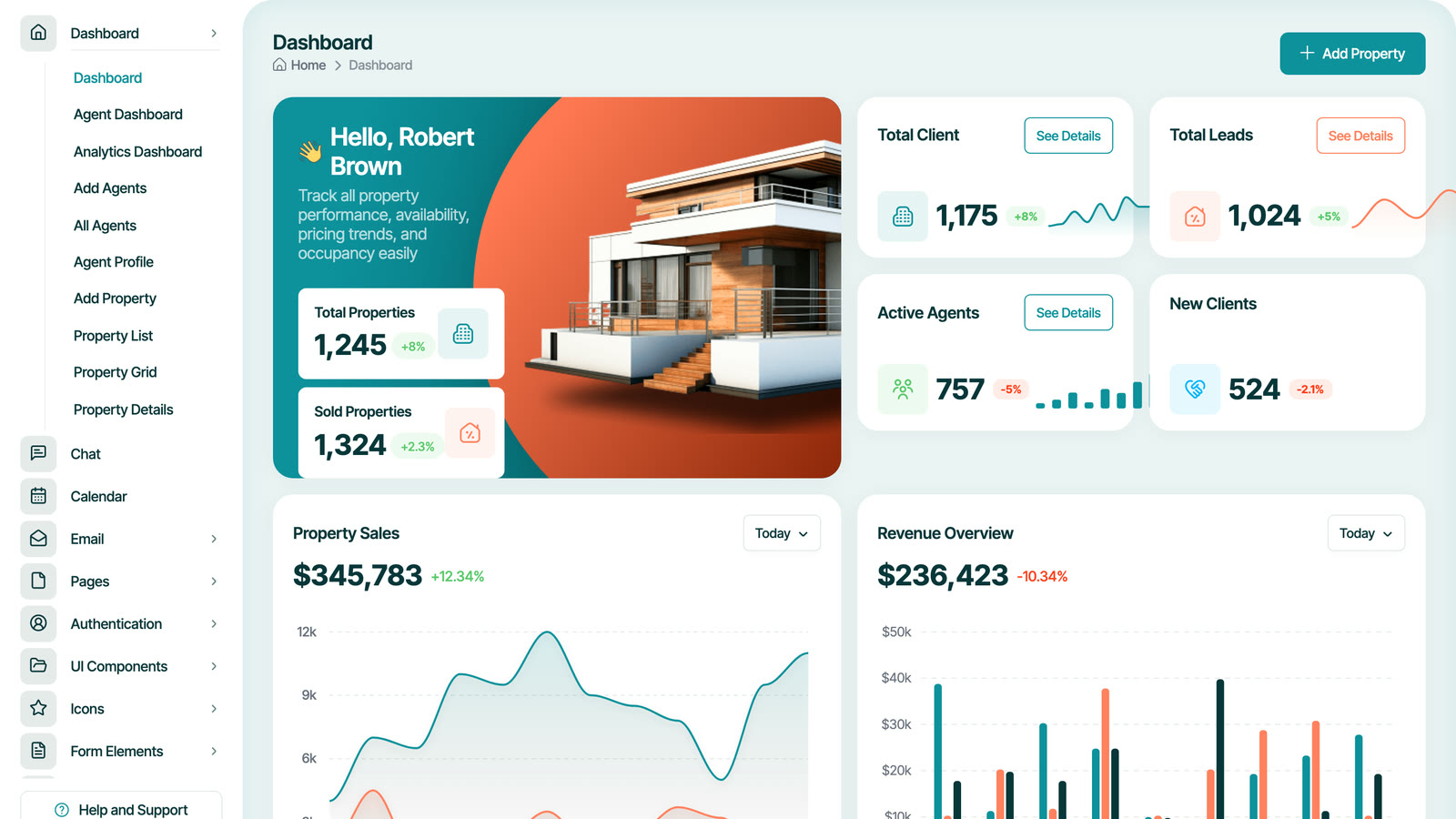
UrbanHub is a new HTML admin template for real estate management. The demo opens on totals for properties, sold properties, clients, leads, active agents and new clients, with property sales and revenue charts. It also has agent and analytics dashboards, property list, grid, details and add pages, agent management, bookings with a calendar, chat and email, across 80+ pages.
- Property overview, agent and analytics dashboards
- Bookings and a calendar for viewings
- Agent add, edit, list and profile pages
- Light, dark and automatic themes
- SCSS source with a documented folder structure
Stack: HTML, Bootstrap 5.3, SCSS, JavaScript.
Price (checked November 2026): $14 for a Regular licence and $900 for an Extended licence. It is new, with 9 sales and no rating yet, and was last updated on 24 April 2026.
Good to know: the listing states it has no backend or database, and the demo images are not included. For a React or Next.js app you would port the markup yourself, so the low price buys a design reference more than a codebase.
How to Choose a Real Estate Dashboard Template
1. Decide whether you need a realtor dashboard or a property management dashboard
The two names are searched as if they were the same product. They are not.
- A realtor or agency dashboard helps sell and let homes. It needs a listings editor with photos and locations, a place where inquiries land with their status and notes, a way to confirm viewings, a map, an agent or team model, and analytics on listings and leads. Velra, CRMS, Lahomes, Shadcn UI Kit and UrbanHub are in this group, and Homez gives the same jobs to individual listing owners.
- A property management dashboard runs rentals after the lease is signed. It needs tenant records, leases, rent due and received per unit, receipts and notices, owner statements and maintenance requests with their status. In this list only MicroRealEstate does the rent side for real, and CRMS names tenant and rental modules on its listing as screens.
Many agencies do both. In that case, either pick the stronger tool for the side that earns most of the money, or plan to build the other side on the same database rather than running two systems.
2. Check the listings editor, not the listing cards
The editor is where staff spend their day. Look for photo ordering with a cover image, a status workflow (draft, published, archived, sold or let), fields for both sale and rent prices, a reference number, location with a map pin, and SEO fields if the listings feed a website. If you sell in two languages, check that the title and description hold both on one record, as Velra's editor does, rather than needing two listings.
3. Make sure leads have somewhere to go
A dashboard that counts leads is not a CRM. Check that an inquiry carries the property it came from, the visitor's contact details and message, a status you can change and notes from the agent. CRMS adds a pipeline and deals on top, Velra keeps the inquiry linked to the property and the viewing it led to, and Shadcn UI Kit, Lahomes and Homez show lead numbers without a lead workflow. Notifications matter too: a lead answered in five minutes is worth more than one answered tomorrow.
4. Viewings need a confirmation step
Booking forms that write straight into a calendar promise slots nobody has checked. A better flow stores the visitor's preferred time as a request and lets an agent confirm, complete or cancel it, which is how Velra handles viewings. If your team thinks in calendars, UrbanHub and Lahomes include calendar pages and CRMS has appointments plus a calendar app, but all three are screens you connect to your own data.
5. Maps: coordinates per listing, and who pays for tiles
Each listing should store its own latitude and longitude, with a choice between showing the exact address or only the area, which protects owners of occupied homes. Then check the map provider: Velra uses OpenFreeMap tiles with OpenStreetMap data, which need no API key, while templates built on Google Maps need a key and a billing account once traffic grows.
6. Property management: tenants, rent and maintenance
If rentals are the business, list what you must track per unit: the tenant, the lease dates and terms, rent due, rent received and the running balance, deposits, receipts, notices, and maintenance requests with who is handling them. MicroRealEstate covers tenants, leases, rent, receipts and a tenant portal. None of the templates here ships a working maintenance ticket system, so plan that part yourself or choose a hosted property management service if it is central to your operation.
7. Analytics that answer real questions
Most dashboards open on revenue charts filled with sample numbers. The questions an agency asks are more specific: how many inquiries came in this week, which listings get views but no inquiries, how many viewings are waiting for confirmation, how long homes stay on the market. Check that the charts can be fed from your own data. Velra's assistant answers questions like these from the agency's data and draws a chart when the question is about a trend.
8. Backend, languages and licence
Only Velra (with its API) and MicroRealEstate save anything out of the box. Every other option here is a set of screens on sample data, and its real cost includes building the backend. For languages, Velra is the only pick with Arabic and a full right-to-left layout in both the dashboard and the website, Lahomes lists RTL support, and MicroRealEstate ships five European languages. On licences, ThemeForest's Regular licence covers one end product whose users are not charged, Shadcn UI Kit's Pro plan covers one user with unlimited projects, MicroRealEstate's SUL limits free use to small private landlords, and the Aniq UI licence covers unlimited commercial projects.
Common Mistakes When Choosing a Real Estate Dashboard
Buying a portal when you need a back office
Many "real estate dashboard" templates are listing websites with a member area. That suits a portal where owners post their own homes, but an agency's staff need shared leads, viewings and roles, which a member dashboard does not have.
Judging by the overview page
Every demo opens on its best page. Click into a lead, a viewing and the property editor before buying, because those are the screens your team will use every day.
Forgetting the backend budget
A $14 or $21 template without a backend is the start of a project, not the end of one. Price in the database, auth, file uploads, notifications and email before comparing it with a product that already has them.
Mixing up sales and rentals
Rent ledgers, leases and maintenance are a different product from listings and leads. Decide which one you are buying, and do not expect a realtor template to grow a rent system with a few extra pages.
FAQ
What is the best real estate dashboard template?
For an agency that wants a back office that works on day one, with the website and the API in the same codebase, the Velra real estate template is the most complete pick here. For the widest set of CRM screens on a small budget, CRMS. For landlords who need rent tracking, MicroRealEstate.
What should a realtor dashboard include?
A listings editor with photos, status and location, an inquiries or leads list with status and notes, viewing requests to confirm, a map of listings, team accounts with roles, and analytics on listings, leads and viewings. A pipeline for deals is useful for larger teams.
What should a property management dashboard include?
Properties and units, tenants, leases, rent due and received with balances, receipts and notices, owner reports and maintenance requests. A tenant portal saves a lot of phone calls.
Is there a free property management dashboard?
MicroRealEstate is free for a private landlord with up to five units and no commercial activity, and you host it yourself. Beyond that, its licence asks for a commercial agreement with the author.
Is there a Next.js real estate dashboard template?
Yes. Velra, Lahomes, Shadcn UI Kit and Homez are built on Next.js 16, and MicroRealEstate's apps run on Next.js 15.5. CRMS and UrbanHub are HTML templates you would port.
Which real estate dashboard supports Arabic and RTL?
Velra runs every screen of the dashboard and the website in English and Arabic, with a full right-to-left layout. Lahomes lists RTL support. The other options do not list Arabic.
Do I need a backend for a real estate dashboard?
Yes, unless the template brings one. Leads, viewings, listings and rent have to be stored, secured and shared between staff. Velra's NestJS API and MicroRealEstate include that layer, and the other templates leave it to you.
Conclusion
If you run an agency and want listings, inquiries, viewings and a map working on a real API, with a matching website and English and Arabic built in, start with Velra. If you want the most CRM screens for the money and will build the server, CRMS is the widest set, and Lahomes and UrbanHub are the cheapest admin UIs. Shadcn UI Kit suits teams already on shadcn/ui, Homez suits portals where owners manage their own listings, and MicroRealEstate is the one to read or run if rent and leases are the job. You can compare the Aniq UI real estate products with live demos on the Next.js real estate templates page.
Related guides
- Best Admin Dashboard Templates by Industry in 2026
- Best Next.js SaaS Templates and Starter Kits for 2026
- Best Next.js Landing Page Templates for 2026 (Free and Premium)
- Best Next.js Templates for 2026: Free and Premium Picks
- Best Next.js E-commerce Templates for 2026 (Free and Paid)
- Best RTL Admin Dashboard Templates with Arabic Support (2026)
- Top 10 Best Next.js Admin Dashboard Templates for 2026
Sources
- Velra Real Estate Agency Dashboard on Aniq UI
- Velra Real Estate Template on Aniq UI
- Velra agency dashboard demo
- CRMS on ThemeForest
- CRMS Property CRM demo
- Lahomes Next.js on ThemeForest
- Lahomes HTML preview
- Shadcn UI Kit real estate dashboard demo
- Shadcn UI Kit pricing
- Homez on ThemeForest
- Homez dashboard demo
- FindHouse on ThemeForest
- MicroRealEstate on GitHub
- MicroRealEstate website and licence summary
- UrbanHub on ThemeForest
- UrbanHub demo
Checked November 2026.
You might also like
How to Build a Real Estate Agency Website in Next.js
Build a real estate agency website in Next.js with property listings, viewing requests and an admin dashboard: setup, staging, roles and launch.
Best Admin Dashboard Templates by Industry in 2026
Compare admin dashboard templates for e-commerce, LMS, real estate, restaurants, hotel booking, gyms, fintech and SaaS: screens, stack, backend and price.
Restaurant Website Templates with Online Ordering (2026)
Compare 7 restaurant website templates with online ordering for 2026: Next.js and React picks, ThemeForest options, free GitHub code and a kitchen dashboard.
