Event Ticketing Website Templates (2026) with Seat Maps
Compare 8 event ticketing website templates for 2026: seat maps, QR tickets, door check-in and payouts, in Next.js, PHP, WordPress and open source.
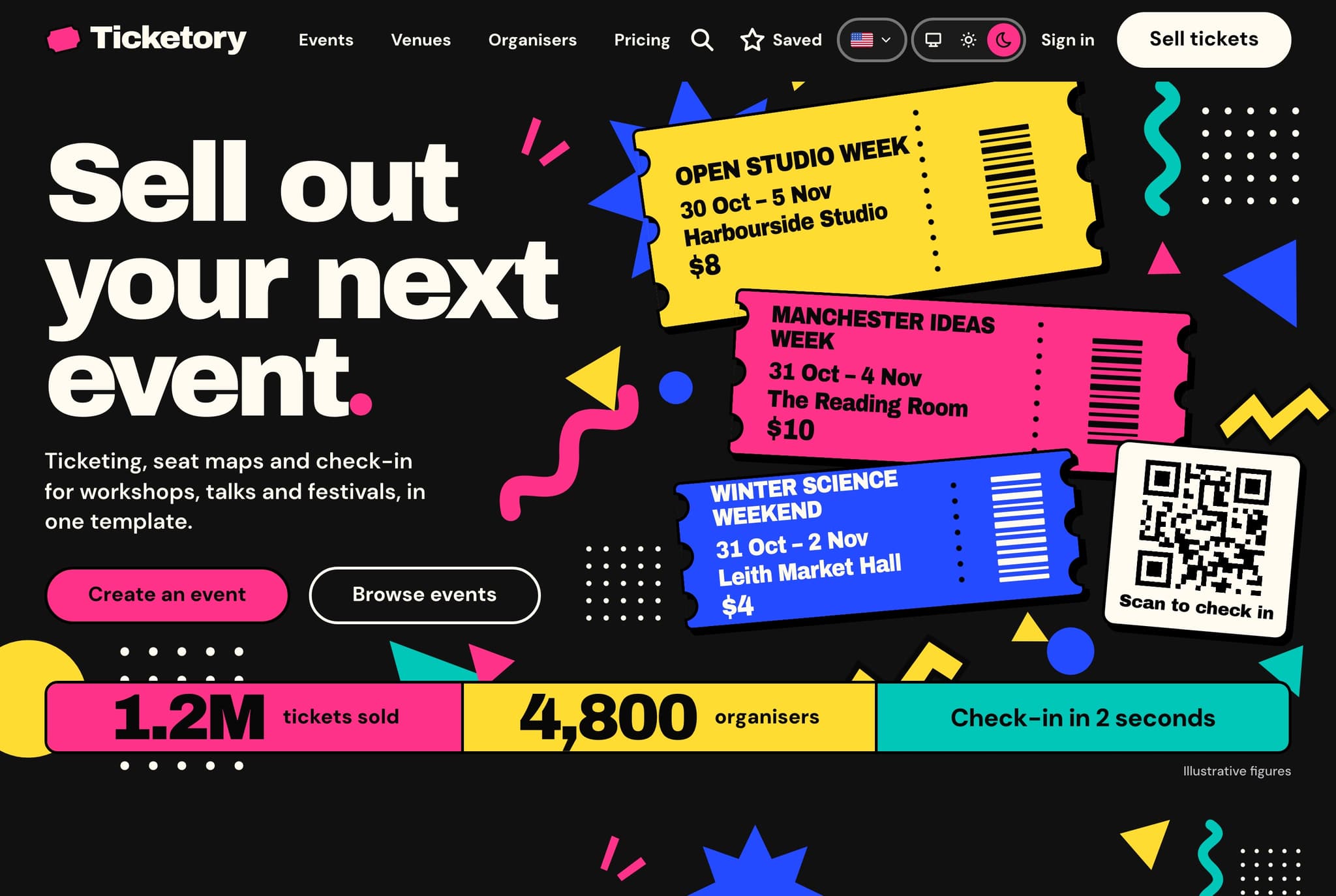
The best event ticketing website template depends on who runs the events. For one organiser or venue that wants a modern codebase with seat maps, QR passes and door check-in, Aniq UI's Ticketory (Next.js and NestJS, from $39, full stack $149) is the most complete pick. For a marketplace of many organisers, Eventic, Evento and Eventmie Pro on CodeCanyon add commissions and payouts. On WordPress, FooEvents or Event Tickets with Seating do the job, and Hi.Events and pretix are the strongest open-source options.
This list is for organisers, venues and the developers and agencies who build ticketing sites for them. What separates a real ticketing site from an events page is the part the visitor does not see: seats held while the buyer pays, a QR code the door can trust, a check-in screen for staff, and an organiser dashboard that shows sales, refunds and the money owed. We opened every product page and every demo on 5 November 2026 and took prices, versions and update dates from those pages.
Checked November 2026.
| Option | Best for | Seat maps | Door check-in | Organiser side and payouts | Price |
|---|---|---|---|---|---|
| Aniq UI Ticketory | One organiser, venue or agency project, in Next.js | Included, versioned layouts, ten-minute holds | Camera or typed code in the dashboard | Organiser dashboard with workspaces; money goes to your own Stripe and PayPal | From $39, full stack $149 |
| Eventic | A ticketing marketplace in PHP | Included (reserved seating module) | Web check-in; mobile scanner app sold separately | Organisers request payouts, the admin approves | $79 on CodeCanyon |
| Evento | A marketplace on a small budget | Included (drag-and-drop builder) | PWA ticket scanner included | Commission per booking and withdrawals | $49 on CodeCanyon |
| Eventmie Pro | A multi-organiser platform in Laravel | Paid add-on | Ticket scanner included | Commissions and payouts to organisers | $48 on sale (list $69) on CodeCanyon |
| Event Tickets | A WordPress site that already runs The Events Calendar | Elite plan only, hosted seat builder | QR check-in app with a paid plan | One organiser; Stripe or WooCommerce | Free plugin; seating in Elite at $599 a year |
| FooEvents | A WooCommerce shop selling tickets | Included in the Premium Bundle | Free iOS and Android check-in app | One organiser; any WooCommerce gateway | $249 a year (Premium Bundle) |
| Hi.Events | Self-hosting an open-source platform | Enterprise licence for production | Phone camera or USB scanner | Several organisers; payouts to your own Stripe account | Free (AGPL with attribution) |
| pretix | Conferences and festivals that want a proven ticket shop | Hosted and Enterprise only | pretixSCAN app | Organiser backend; your own payment provider | Free self-hosted; Hosted 2.5% per ticket |
What makes a ticketing website more than an events page?
Five things, and most event templates have none of them. An events template shows a programme, speakers and a "Buy tickets" button. A ticketing website has to do the work behind that button.
- Seats or places held while the buyer pays. Two people must never buy the same seat, and an abandoned cart must give its seats back.
- A payment that the server confirms. The order is paid when the payment provider says so, not when the buyer lands on a thank-you page.
- A ticket the door can trust. A QR code that the server signed, that works once, and that stops working when the ticket is refunded or reissued.
- A check-in screen for door staff. On a phone, with a clear answer: let in, already in, wrong session or void.
- An organiser dashboard. Events, seat layouts, orders, refunds, reports and, on a marketplace, the money owed to each organiser.
The table above says which of these each option covers. The sections below give the detail.
Best Event Ticketing Website Templates in 2026
1. Aniq UI Ticketory
Best for: an organiser, a venue with its own programme, or an agency building a client's ticketing site, who wants a Next.js codebase with seat maps, QR passes, door check-in and an organiser dashboard, in English and Arabic.
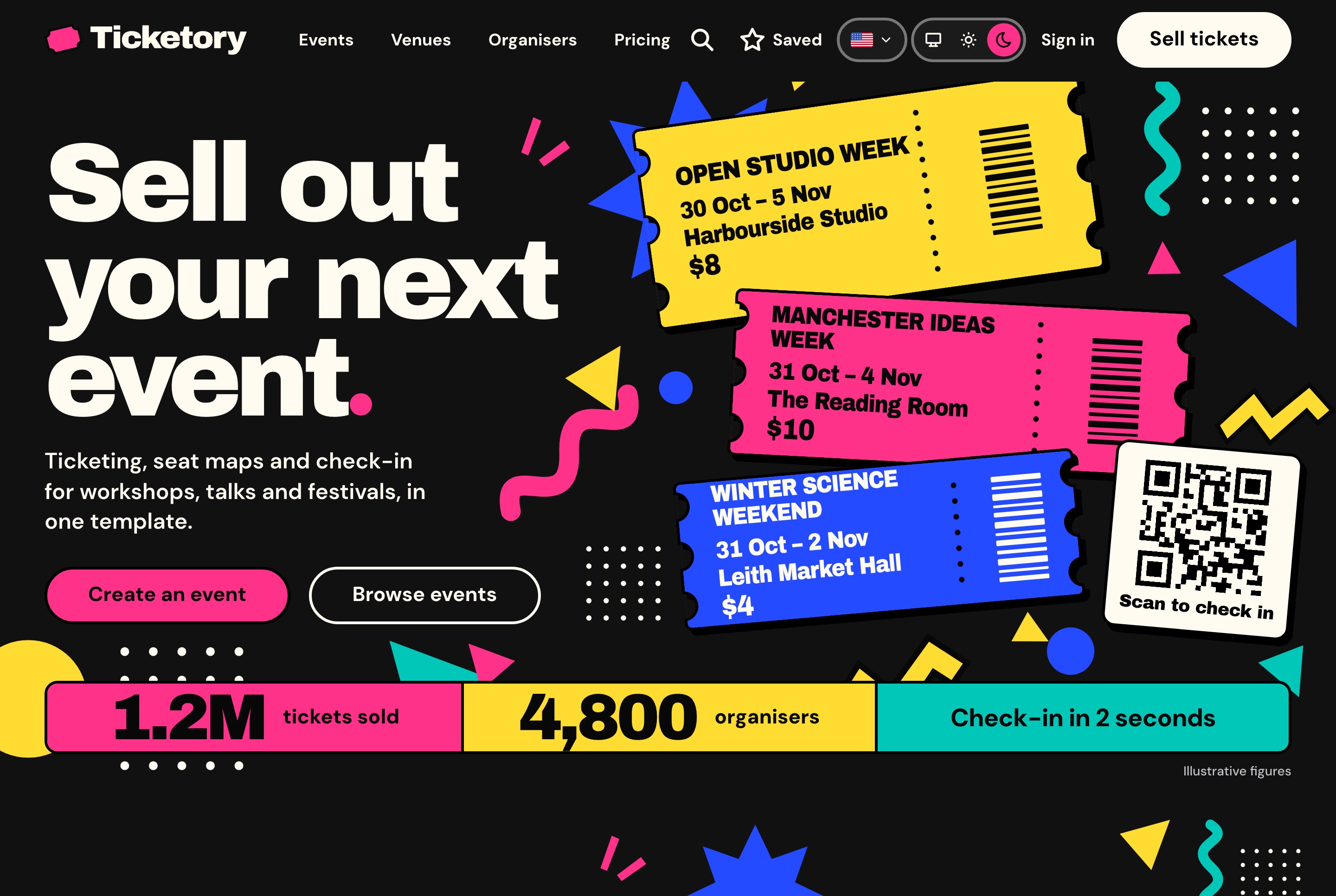
Ticketory is a full-stack event ticketing template made of three apps: a ticketing website for attendees, an organiser dashboard, and a NestJS API that both use. Attendees search events by city, dates and category, with the filters kept in the address so a search can be shared. Each event page has About, Schedule and Venue tabs beside the booking panel and a preview of the room's seats.
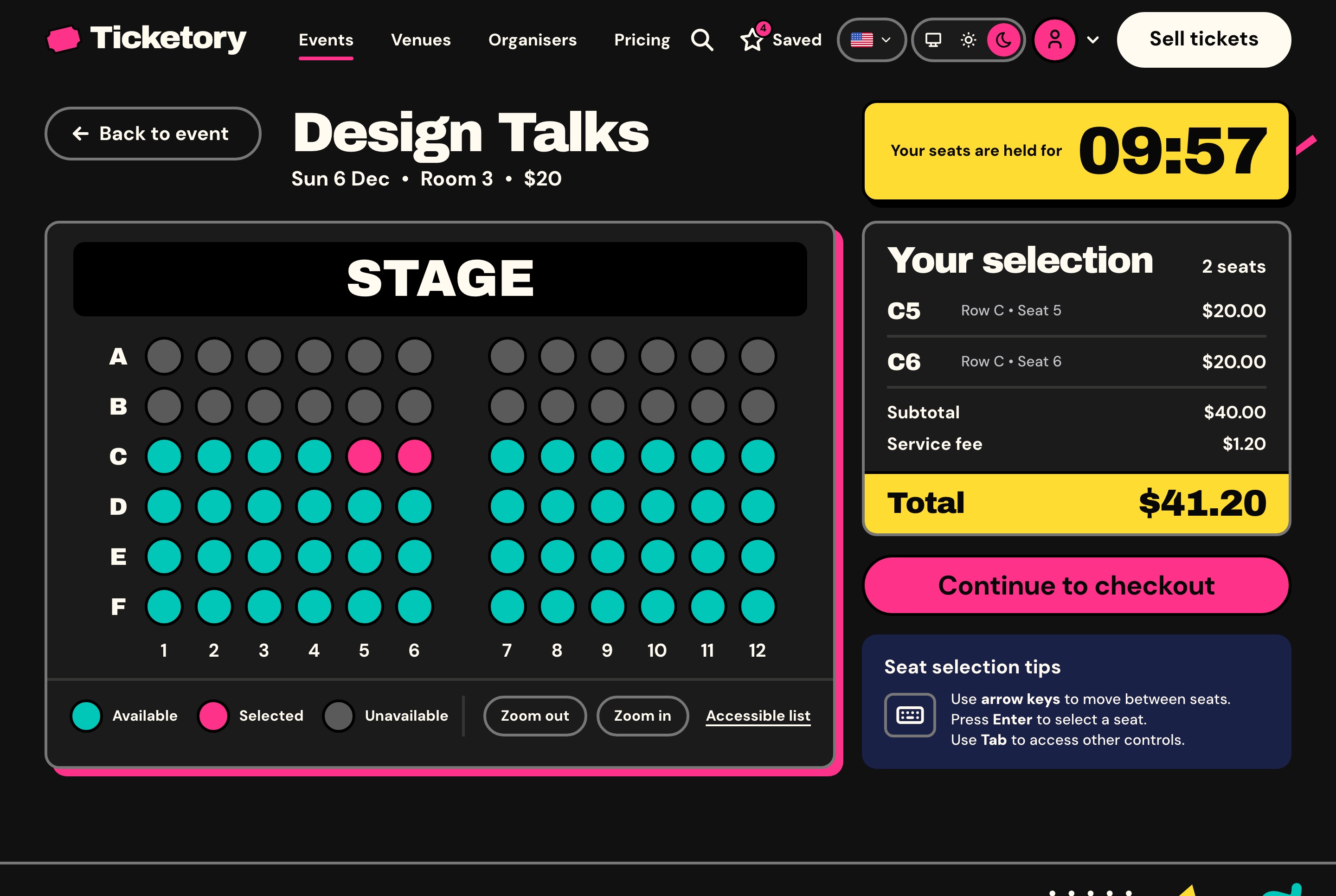
On a reserved-seating event, the first seat a buyer picks starts a hold, ten minutes in the seeded data, counted on the server's clock. Seats are taken with a conditional update on the server, so two buyers can never hold the same seat, and a seat whose hold runs out is free again at once. The map refreshes every 20 seconds, marks accessible and companion seats, works with the keyboard, and has an accessible list view of the same seats. General admission events hold a number of places instead.
Checkout takes every amount from the hold, so the browser never sends a price. The buyer pays on Stripe's hosted Checkout or on PayPal, and the API marks the order paid from the provider's signed webhook. Free tickets skip payment altogether, and a test payment stands in while no live key is set. If a late payment arrives for seats that went to someone else, it is refunded in full rather than overselling the room.
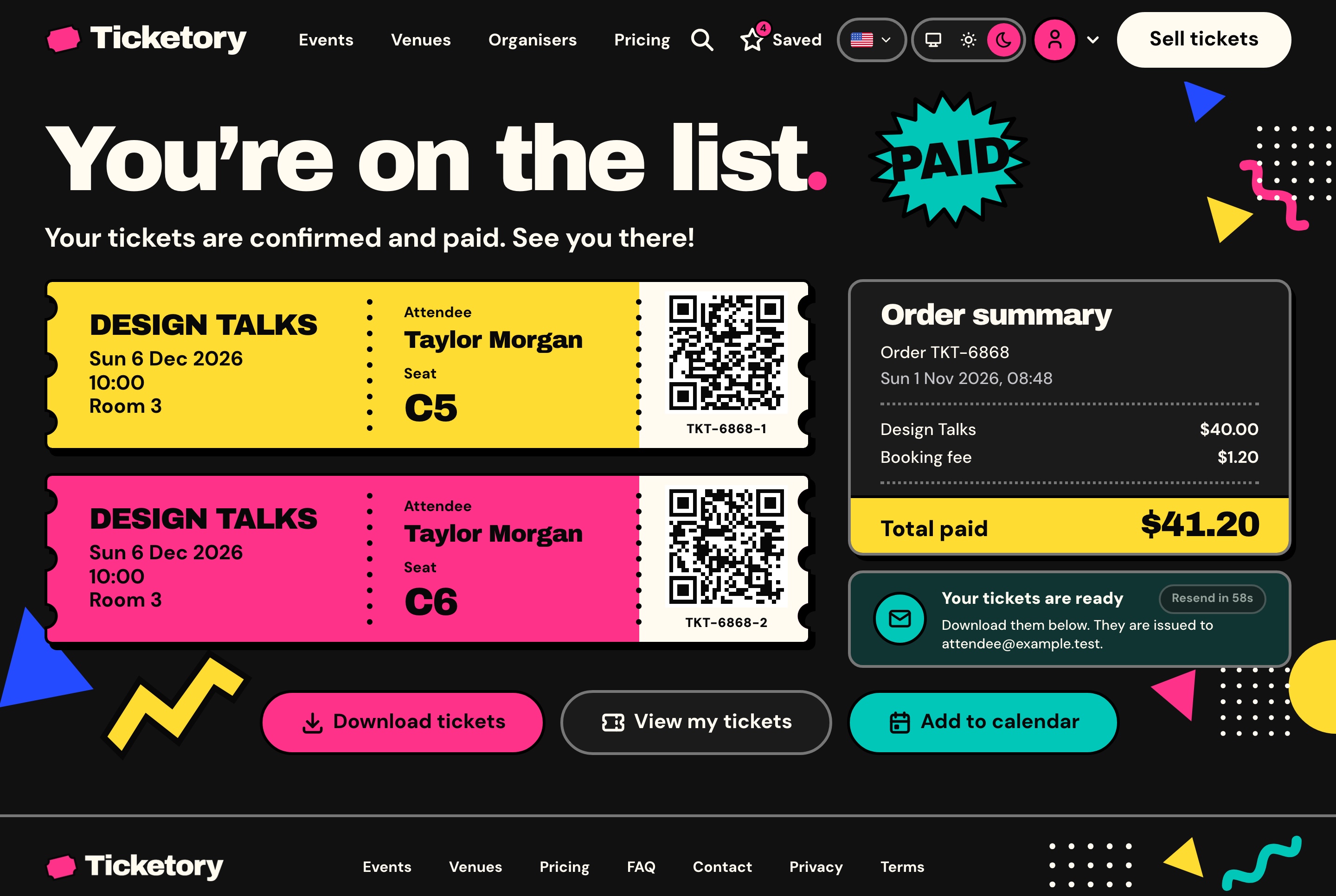
A paid order gets one pass per ticket with a QR code signed by the server, plus a PDF, a calendar file and an email. Only a hash of each code is stored, and a reissued ticket's old code stops working at once. Attendees can buy as guests or keep their tickets, orders and saved events in an account.
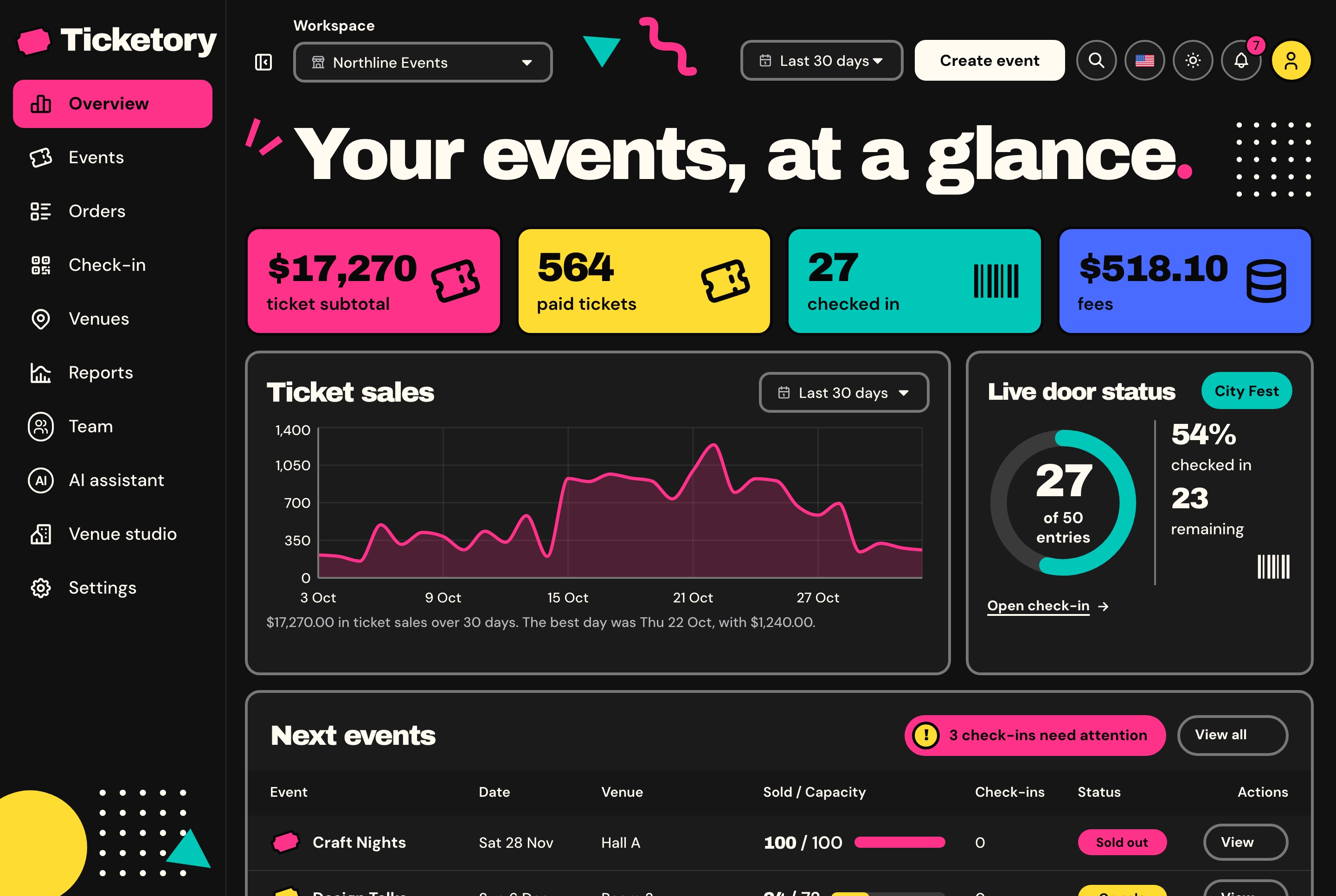
The organiser dashboard opens on sales, paid tickets, check-ins and fees, with the live door of the session that is open. Organisers edit events in English and Arabic with up to ten ticket types, and draw seat layouts of up to 40 rows of 60 seats with aisles, price tiers and accessible seats. A published layout version never changes, so seats already sold keep pointing at it. Refunds cover whole tickets: the tickets are suspended at once and voided when Stripe or PayPal confirms, which puts the seats back on sale.
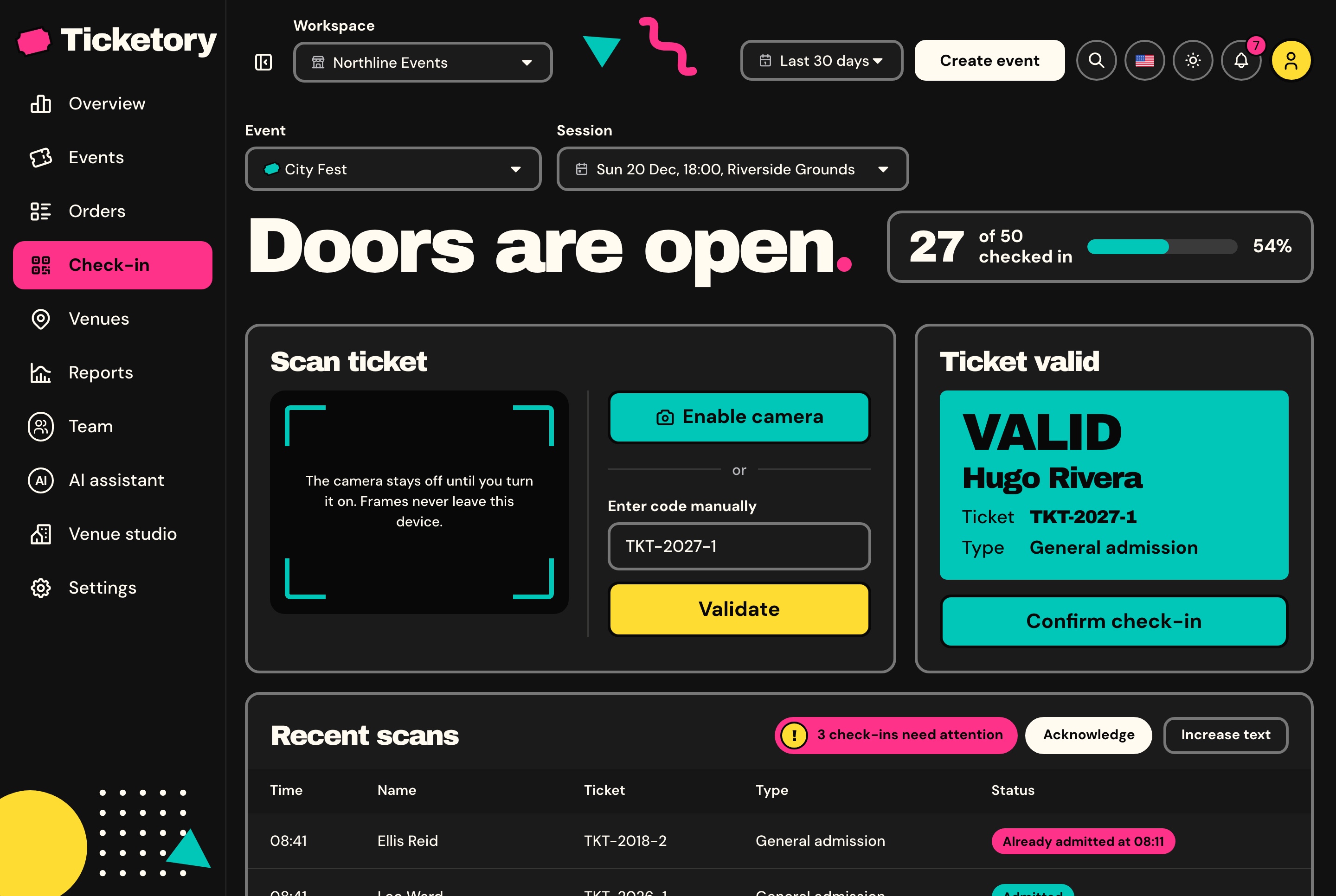
At the door, staff scan the QR code with the device camera, decoded in the browser, or type the ticket reference. A ticket is looked at first and admitted on a second step, and the database admits each ticket once per session, so two doors scanning it at the same moment let it in once. Check-in staff see only the sessions assigned to them.
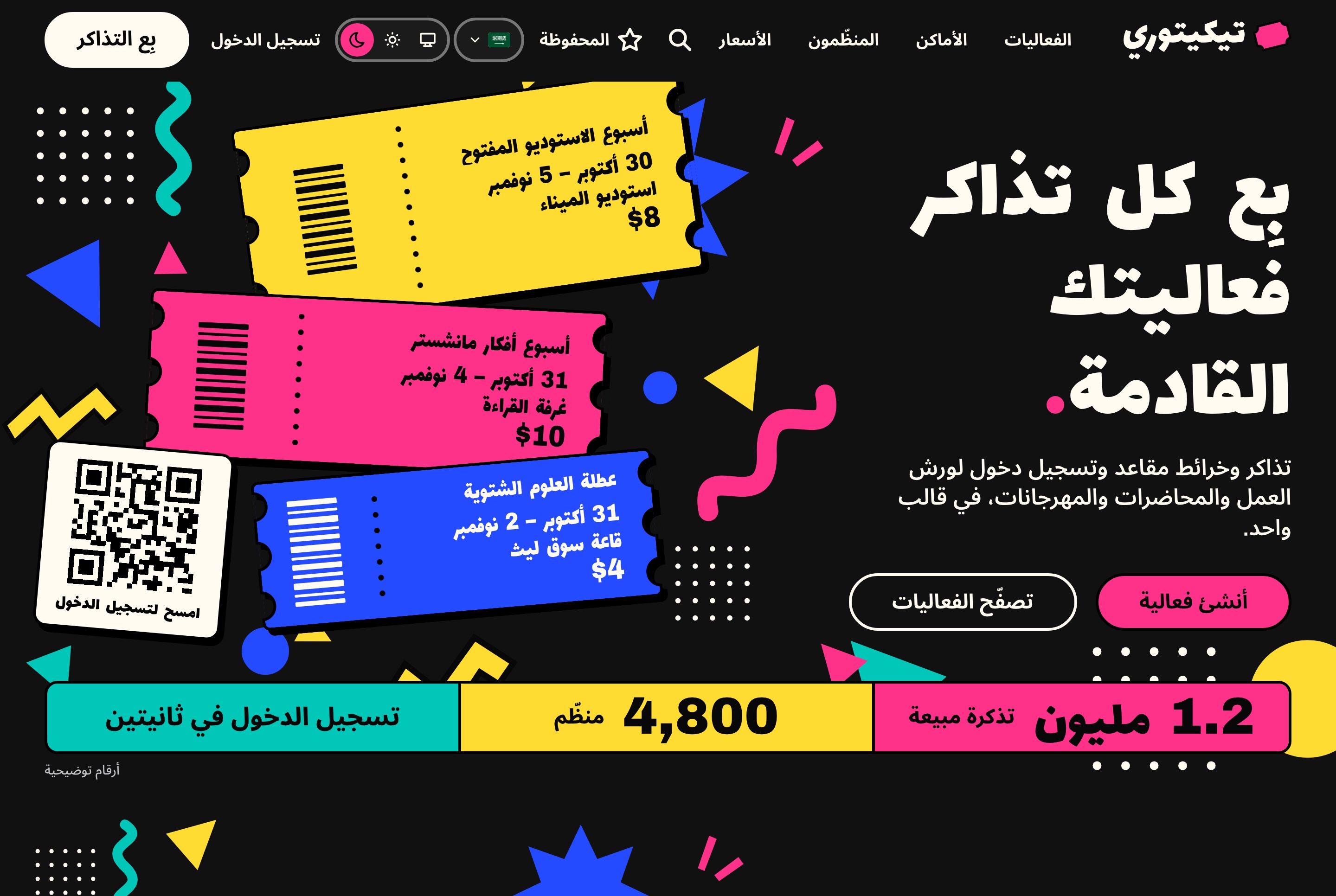
- Ticketing website: events, event pages, seat selection, checkout, ticket passes, attendee accounts, venues, organisers, FAQ and contact
- Workspaces, each with its own currency (five to choose from), booking fee from 0 to 20 percent, hold time, time zone and team
- Roles seeded as Owner, Manager, Finance and Check-in, edited permission by permission
- Reports by period, event, provider and category, with CSV exports of orders and attendees
- An AI event assistant on Google Gemini, OpenAI or DeepSeek with your own key, and a venue studio on Google Gemini
- A seeder with four organisers, 9 venues, 36 events and 1,145 orders
Built with: Next.js 16.4 App Router, React 19.3, TypeScript 5.9, Tailwind CSS 4.3, TanStack Query, next-intl, MapLibre, Recharts, NestJS 11, TypeORM on SQLite or MySQL, Socket.io, Stripe and PayPal. The latest release is dated 4 November 2026.
Price (checked November 2026): the full stack package with all three apps is $149, less than the $187 the parts cost separately. The ticketing website alone is $39, the organiser dashboard $49 and the Backend API $99. A launch offer of 30% off for the first three buyers was open when we checked; the product page shows whether it still is. It is a one-time payment, and the licence covers unlimited commercial projects, client work included.
Limits: the website and the dashboard read their data from the Ticketory API, so buying one alone still needs the Backend API for real sales. Payments go to your own Stripe and PayPal accounts; splitting money between several organisers is not described, so a marketplace that pays out to other organisers needs that built. The product page lists what is not included: tax setup, news emails to attendees, check-in without a connection, and Arabic text in the PDF tickets (the Arabic ticket is the web pass). Emails need a Resend key, and you host the three apps yourself.
Links: Website demo · Organiser dashboard demo · Product page
2. Eventic on CodeCanyon
Best for: a team launching a ticketing marketplace where many organisers sell tickets, who want reserved seating in the main script and are happy with PHP.
Eventic is a ticket sales and event booking system by mtrsolution, built on Symfony. Organisers create events, sell tickets, contact attendees and request payouts to a payout account, which the administrator approves. Version 1.5 added a reserved seating module with a layout builder, seat selection for attendees and seat selection at the point of sale.
Tickets carry QR codes in their PDF. Scanner accounts can check tickets through the web platform, and the Eventic Ticket Scanner mobile app is a separate CodeCanyon item ($19 when we checked, last updated January 2021). The demo lists PayPal, Stripe, Mercado Pago and Flutterwave, plus offline payment and a point-of-sale gateway. Its language menu offers eight languages, Arabic among them.
- Reserved seating with a layout builder
- QR codes on PDF tickets
- Organiser payouts approved by the admin
- Point of sale and offline payments
- Eight languages in the demo, including Arabic
Built with: Symfony 8, PHP 8.5, MySQL 8 (version 2.0, July 2026). Last updated 16 July 2026, according to the product page.
Price (checked November 2026): $79 for a Regular licence and $299 for an Extended licence, with 844 sales shown on the listing.
Limits: the listing does not say that the layout mirrors right to left, even though Arabic is offered, so check the Arabic demo pages before you promise RTL to a client. The mobile scanner app is older than the main script. Envato's Regular licence covers one end product that users are not charged for, so read the licence terms before you build a paid platform on it.
Links: Live demo · CodeCanyon page
3. Evento on CodeCanyon
Best for: the lowest-cost marketplace with a seat map builder, organiser withdrawals and an Arabic front end.
Evento is an event ticket booking marketplace by KreativDev, an Elite Author on Envato. It has a drag-and-drop seat map builder for every ticket type, seat and slot booking from the website, an organiser panel, a commission on each booking for the admin, and withdrawal management with transaction history. A PWA ticket scanner is included in the main item.
The listing names 18 online payment gateways and unlimited offline ones. Version 5.0, from 17 April 2026, added AI features and several currencies. The demo opens in English or Arabic, with separate sign-up for customers and organisers.
- Drag-and-drop seat map builder
- PWA ticket scanner included
- Commission setup and organiser withdrawals
- 18 online payment gateways
- Multilingual front end with RTL, and Arabic in ticket PDFs
Built with: Laravel 9.52.7 with PHP 8.3 and MySQL. Last updated 4 May 2026, according to the product page.
Price (checked November 2026): $49 for a Regular licence and $199 for an Extended licence, with 467 sales shown on the listing.
Limits: the listing says the admin and organiser dashboards are "not RTL yet", so only the public site mirrors for Arabic. It runs on Laravel 9, several major versions behind the Laravel 13 that Hi.Events uses. The demo's home page still carries placeholder text, so judge the design from the event and seat pages.
Links: Live demo · CodeCanyon page
4. Eventmie Pro on CodeCanyon
Best for: a multi-organiser platform in Laravel where the admin takes a commission and pays organisers, and general admission is enough at first.
Eventmie Pro is an event ticket selling and management platform by Classiebit. Organisers publish events and sell tickets, the admin earns a commission on each paid booking and transfers payouts to organisers, and an analytics dashboard tracks check-ins, sales and active events. Buyers get PDF tickets with a QR code after checkout, and an integrated scanner validates them at the entrance.
Reserved seating is a separate, paid add-on, and so are the Stripe 3D Checkout, Authorize.net and BitPay gateways. The demo's language menu includes Arabic, and the listing names RTL layouts. A larger edition, FullyLoaded, is sold separately.
- Multi-organiser publishing with commissions
- Payouts to organisers managed by the admin
- QR PDF tickets and an integrated scanner
- Organiser analytics dashboard
- Multi-language with RTL
Built with: Laravel, PHP 8.x, MySQL 8.x. Version 3.0.2, released 15 October 2026.
Price (checked November 2026): $48 for a Regular licence, reduced from $69 when we checked, and $299 for an Extended licence, with 171 sales shown on the listing.
Limits: seat maps and some payment gateways cost extra, so add them up before you compare it with a script that includes them. The listing does not name the Laravel version, so ask the author which one the current release runs on.
Links: Live demo · CodeCanyon page
5. Event Tickets with Seating (WordPress)
Best for: an organiser whose site already runs WordPress and The Events Calendar, and who wants tickets and RSVPs on the same events.
Event Tickets and Registration is the free ticketing plugin from the team behind The Events Calendar, now listed under Nexcess. It adds RSVPs and tickets to WordPress events, with sales through its own Tickets Commerce (Stripe or PayPal) or through WooCommerce. Version 5.31.0 was released on 4 November 2026, and the plugin shows more than 90,000 active installations.
Seating adds a drag-and-drop seat map builder inside WordPress, ticket tiers mapped to seat zones, seat selection at checkout with a hold timer, and a roster where admins swap or reassign seats. It is part of the Elite plan, at $599 a year, and works by connecting to a hosted Seating Builder service with a valid licence. The product page also describes a QR check-in app for iOS and Android that works offline and syncs later.
- Free tickets and RSVPs in the core plugin
- Stripe or PayPal through Tickets Commerce, or WooCommerce
- Seat maps, zones and hold timers in the Elite plan
- QR check-in app that works offline
Built with: WordPress (tested up to 7.1.4), with The Events Calendar for event pages.
Price (checked November 2026): the plugin is free. The changelog says Tickets Commerce takes a 2% application fee, waived on Stripe and Square once an Event Tickets Plus licence is active. Seating is in the Elite plan at $599 a year.
Limits: Seating needs the block editor and a hosted service, so it stops working if the licence lapses. It is built for one organiser's own events, not a marketplace with payouts. RTL is up to your WordPress theme, and the seat builder's right-to-left behaviour is not described.
Links: WordPress.org page · Seating page
6. FooEvents for WooCommerce
Best for: a business that already sells through WooCommerce and wants tickets, reserved seats and check-in without a per-ticket fee.
FooEvents turns WooCommerce products into tickets, using WooCommerce's checkout, payment gateways, taxes and coupons. The Seating extension adds seating charts where buyers pick seats, groups such as rows, tables or areas, seats linked to product variations for different prices, and the seat printed on each ticket. Staff check attendees in with the free FooEvents Check-ins app for iOS and Android.
- Seating charts and seat selection on the product page
- Free iOS and Android check-in app
- PDF tickets and ticket themes
- Any of the 100+ WooCommerce payment gateways
- No commission or ticket fees from FooEvents
Built with: WordPress and WooCommerce.
Price (checked November 2026): the Premium Bundle, which includes Seating, the check-in app, PDF tickets, multi-day events and the calendar, is $249, billed every year for updates and support. Seating alone is $69 on top of the core plugin. Each domain needs its own licence.
Limits: it sells one shop's own tickets, so payouts to other organisers are not part of it. The bundled translations do not include Arabic, so Arabic text and RTL depend on your theme and your own translation files. Time-slot bookings are in a separate Bookings plugin, not in the Premium Bundle.
Links: Pricing · Seating extension
7. Hi.Events (open source)
Best for: a technical team that wants to self-host an open-source ticketing platform on a current stack and can keep its attribution on the pages.
Hi.Events is an open-source event management and ticket selling platform, self-hosted or on its own cloud. Version 2.0.0, released on 23 October 2026, added recurring events, reserved seating, a box office, lineups and schedules, single sign-on and team permissions. It covers paid, free, donation and tiered tickets, promo codes, waitlists, branded PDF tickets, check-in by phone camera or USB scanner with shareable check-in lists, and payouts to your own Stripe account.
- Recurring events with per-date prices and capacity
- Check-in lists with live counts
- Several organisers under one account
- REST API, webhooks and CSV or XLSX exports
- 21 languages
Built with: Laravel 13 (PHP 8.3 or later), React 19 with server-side rendering, TypeScript, PostgreSQL, Redis and Docker. About 4,100 GitHub stars.
Price (checked November 2026): free under AGPL-3.0 with additional terms. Commercial licences are offered to remove the attribution or for white-labelled use.
Limits: the additional terms require the "Powered by Hi.Events" attribution to stay on pages and emails the software generates. Reserved seating and the box office are covered by the Hi.Events Enterprise Licence and need a licence for production use. Arabic is not among the 21 languages.
Links: Live demo event · GitHub repository
8. pretix (open source)
Best for: conferences, festivals and exhibitions that want a proven ticket shop, either self-hosted for free or hosted with a fee per ticket.
pretix is an open-source ticket shop and organiser backend, with companion apps for the door (pretixSCAN) and the cash register (pretixPOS). Version 2026.9.0 was published on 29 October 2026. You can install the Community edition on your own server, or use pretix Hosted, which includes the shop, access control and point-of-sale software.
- Online ticket shop and organiser backend
- pretixSCAN for access control at the door
- PayPal, Stripe, Mollie or your own bank account
- An Arabic translation file ships in the repository
Built with: Python 3.11 or later and Django 5.2. About 2,600 GitHub stars.
Price (checked November 2026): Community is free to self-host. pretix Hosted charges 2.5% of the ticket price excluding tax, never more than €15 (or USD 17) per ticket, plus your payment provider's fees. The first 500 free tickets a year are free, and then free tickets cost €0.50 each.
Limits: the seating plan is available on pretix Hosted and pretix Enterprise only, not on Community. The licence is AGPLv3 with additional terms: the "built using pretix" notice must stay at the bottom of every generated page, and offering pretix to third parties as a service comes with conditions. Check how complete the Arabic translation is before you plan an Arabic shop.
Links: Pricing · GitHub repository
Checked and left out
Attendize, a well-known open-source ticketing platform, has not had a release since version 2.8.0 in January 2023, so we did not list it. Eventify, a Next.js event template on ThemeForest, was last updated in November 2024 and lists no ticket, checkout or seat pages. EventLab on CodeCanyon was updated in October 2026, but its listing describes no seat maps, QR tickets or check-in.
How to Choose an Event Ticketing Website Template
1. Decide: one organiser or a marketplace
This choice removes half the list. If you sell your own events, or build a site for one client, you need a ticketing site with an organiser dashboard: Ticketory, Event Tickets, FooEvents or pretix. If many organisers will sell on your platform and you take a cut, you need commissions and payouts: Eventic, Evento and Eventmie Pro are built for that, and Hi.Events supports several organisers with payouts to your own Stripe account.
2. Check how seats are held
A seat map that looks right can still sell one seat twice. Ask where the hold lives, how long it lasts, and what happens when two people press the same seat at the same moment. In Ticketory the hold is counted on the server's clock and seats are taken with a conditional update, so the second buyer simply cannot take it. Also check whether seat maps are in the price: they are included in Ticketory, Eventic, Evento and the FooEvents Premium Bundle, and cost extra in Eventmie Pro, Event Tickets (Elite) and Hi.Events (Enterprise).
3. Check what confirms a payment
An order should be marked paid by the payment provider's signed webhook, checked on the server. A buyer can close the tab before the thank-you page loads, and a thank-you page can be opened by hand. Also check what happens when a payment arrives after the hold has expired and the seats are gone: Ticketory refunds it in full rather than overselling.
4. Test the door check-in on a phone
The door is where a ticketing site is judged. Open the check-in screen on a phone and ask: does it scan with the camera, can staff type a code when the camera fails, and does it say clearly whether a ticket is valid, already used or for another session? Then ask what happens offline. Ticketory checks in online only, and lists offline check-in as not included; the Event Tickets app works offline and syncs later.
5. Look at the organiser dashboard and payouts
Open the organiser demo, not only the public site. You want sales by event, orders with their payment status, refunds that wait for the provider, exports, and a team with roles so door staff see only the door. On a marketplace, find the payout screen: who requests the money, who approves it, and how fees are recorded. Ticketory sends money to your own Stripe and PayPal accounts and has no payout split between organisers, while Eventic, Evento and Eventmie Pro all describe payouts.
6. Languages and right-to-left layout
For events in Arabic-speaking countries, translated words are not enough. The seat map, the checkout, the ticket and the dashboard all have to mirror, and prices and ticket codes have to stay readable. Ticketory ships English and Arabic with full RTL on both the website and the dashboard, with Latin digits. Evento mirrors its public site but says its dashboards are "not RTL yet". Eventic and Eventmie Pro offer Arabic in their demos, and Hi.Events and FooEvents do not list Arabic.
7. Count fees and licences
Template prices are small next to fees. A hosted platform takes a share of every ticket: pretix Hosted takes 2.5% up to €15, and Event Tickets' Tickets Commerce takes 2% unless you hold a Plus licence. Templates and scripts charge once or yearly instead. Read the licence too: an Envato Regular licence covers one end product that users are not charged for, the AGPL projects require attribution, and the Aniq UI licence covers unlimited commercial projects, client work included.
8. When a template is the wrong choice
If you run a few events a year and nobody on your side writes code, a hosted ticketing service is simpler, even with its fee. A template or a script makes sense when you sell often enough that per-ticket fees add up, when you want your own design and your own buyer data, or when you are an agency that builds ticketing sites for clients.
Common Mistakes When Choosing a Ticketing Template
Buying an events page
Many "event templates" are conference landing pages with a schedule and a pricing table. If there is no seat or place hold, no order and no check-in, it is not a ticketing site.
Taking a seat picture for a seat map
A drawing of seats is not a seat map. Check that seats are stored, held, sold once and released, and that the organiser can edit the layout.
Trusting the thank-you page
An order confirmed when the buyer comes back from the payment page can be lost or faked. Confirmation belongs to the provider's webhook.
Forgetting the door
A QR code is only useful if something checks it. Make sure a ticket can be used once, that a refunded ticket stops working, and that staff have a screen that works on a phone.
Missing the add-ons
A low price can hide paid extras: a seating add-on, a scanner app, payment gateways, a yearly plan. Add them up before you compare.
FAQ
What is the best event ticketing website template?
For one organiser, venue or agency project in Next.js, Aniq UI Ticketory is the most complete pick here, with seat maps, QR passes, door check-in, an organiser dashboard and an API, from $39 or $149 for the full stack. For a marketplace of many organisers in PHP, start with Eventic or Evento.
Is there a free event ticketing template?
Hi.Events and pretix are free and open source, and the Event Tickets plugin for WordPress is free. All three have limits: Hi.Events needs an Enterprise licence for reserved seating in production, pretix Community has no seating plan, and Event Tickets puts seating in its Elite plan. Both open-source projects require their attribution to stay on the pages.
Which ticketing templates have seat maps?
Ticketory, Eventic and Evento include seat maps in the price, and FooEvents includes them in its Premium Bundle. Eventmie Pro sells reserved seating as an add-on, Event Tickets includes it in the Elite plan, Hi.Events needs an Enterprise licence, and pretix offers it on Hosted and Enterprise.
How does QR code check-in work on a ticketing website?
Each paid ticket gets a QR code that the server signs. At the door, staff scan it with a phone or a scanner, the server checks that the ticket is valid and not used, and marks it as admitted. In Ticketory a ticket is admitted once per session even if two doors scan it at the same moment, and a refunded or reissued ticket's code stops working.
Can I build an event booking website with Next.js?
Yes. Next.js handles the event pages, search and checkout well, but the holds, payments, tickets and check-in need a backend. Ticketory pairs a Next.js website and a Next.js dashboard with a NestJS API, so the server decides prices, holds and admissions.
Which ticketing templates support Arabic and RTL?
Ticketory ships English and Arabic with a full right-to-left layout on the website and the organiser dashboard. Evento's public site supports RTL but its dashboards do not yet. Eventic and Eventmie Pro offer Arabic in their demos, and pretix includes an Arabic translation file.
Conclusion
If you sell your own events, or build a ticketing site for a client, and want seat maps, QR passes, door check-in and an organiser dashboard in a modern Next.js codebase with Arabic built in, start with Ticketory. You can buy the website or the dashboard alone, as long as you add the Backend API.
If you are building a marketplace for many organisers, Eventic includes reserved seating and payouts, Evento costs the least, and Eventmie Pro describes commissions and organiser payouts in the most detail but sells seating as an add-on. On WordPress, FooEvents suits a WooCommerce shop and Event Tickets suits a site that already runs The Events Calendar. For open source, Hi.Events has the newer stack and pretix the longer track record, with attribution required on both.
Ticketory packages and prices
What each package costs, paid once, with the source code, the documentation and the live demos:
- Ticketing website (events, seat selection, checkout, QR passes, attendee accounts): $39.
- Organiser dashboard (events, seat layouts, check-in, orders, refunds, reports): $49.
- Backend API (NestJS, holds, payments, tickets, check-in): $99.
- Full stack (website, dashboard and API together): $149.
- All 10 templates: the bundle, list price $499; check the page for the current offer.
Browse the templates and open any demo in Arabic before you buy.
Related guides
- Vacation Rental and Booking Website Templates (2026)
- Restaurant Website Templates with Online Ordering (2026)
- Real Estate Dashboard Templates (2026): Realtor and Property Management
- Best Admin Dashboard Templates by Industry in 2026
- Next.js Website Templates for Small Businesses (2026)
Sources
- Aniq UI Ticketory product page
- Eventic on CodeCanyon
- Evento on CodeCanyon
- Eventmie Pro on CodeCanyon
- Event Tickets and Registration on WordPress.org
- The Events Calendar Seating
- FooEvents pricing
- FooEvents Seating
- Hi.Events on GitHub
- pretix on GitHub
- pretix pricing
- pretix seating documentation
- Attendize on GitHub
- Envato licences
Checked November 2026.
You might also like
How to Design a Landing Page: Steps and Ready Templates
Design a landing page that converts: the 7 sections in order, Arabic RTL tips, speed and SEO basics, common mistakes, and ready templates, free or $39.
Vacation Rental and Booking Website Templates (2026)
Compare 7 vacation rental and booking website templates for 2026: Next.js with an availability calendar, Stripe and host dashboards, plus WordPress and Laravel.
Restaurant Website Templates with Online Ordering (2026)
Compare 7 restaurant website templates with online ordering for 2026: Next.js and React picks, ThemeForest options, free GitHub code and a kitchen dashboard.
