Best Arabic Fonts for Web UI (2026), Tested in a Dashboard
12 free Arabic fonts for web UI, tested in a real dashboard: weights, numerals, line height, Latin pairing, and how to load them in Next.js with next/font.
For most web interfaces, the best Arabic font is IBM Plex Sans Arabic or Noto Sans Arabic: both stay clear at 14px, their digits line up in table columns, and both come with a matching Latin alphabet. Pick Cairo or Almarai when you want a softer, friendlier look, Noto Kufi Arabic or El Messiri for headings, and Amiri only for long reading text. All 12 fonts below are free on Google Fonts under the SIL Open Font License, and each one loads in Next.js with next/font.
We did not pick these from a list. We set the same Arabic dashboard card (a heading, two KPI numbers, a table, a paragraph and two buttons) in each font, screenshotted it in Chrome 156, measured the numerals, line heights and file sizes, and built the Next.js setup below on Next.js 16.4.5. Checked November 2026.
How we tested the fonts
Every font got the same job: one dark dashboard card in Arabic, right to left, 560px wide. The card has a 20px heading, a 30px revenue figure in Latin digits, a second figure in Arabic-Indic digits, a two-row order table at 14px, a 15px paragraph with "Next.js API" inside the Arabic sentence, and two buttons. Each font loaded from Google Fonts at three weights (regular, medium and bold, or the closest weights the font has), and the line heights were set explicitly so the cards could be compared.
Then we measured three things in the same browser:
- Numerals: whether "1111" and "0000" have the same width, with and without
font-variant-numeric: tabular-nums, in Latin and in Arabic-Indic digits. - Default line height: the height of one Arabic line with
line-height: normal, as a multiple of the font size. - Size: the woff2 file Google Fonts sends Chrome for the Arabic subset at weight 400, and the width of the same Arabic sentence at the same font size.
Licences, weights and axes come from the Google Fonts catalogue data and from each font's licence file in the google/fonts repository, read on 5 November 2026.
Arabic web fonts compared
All 12 are free for commercial use under the SIL Open Font License 1.1 and support Latin as well as Arabic. "Lines up" means a column of Latin prices keeps every digit the same width.
| Font | Best for | Weights | Variable | Arabic file, weight 400 | Latin digits line up |
|---|---|---|---|---|---|
| IBM Plex Sans Arabic | Dashboards, dense UI | 7 (100 to 700) | No | 32.7 KB | Yes, by default |
| Noto Sans Arabic | Dashboards, body text | 100 to 900 | Yes (weight, width) | 47.8 KB | Yes, by default |
| Cairo | Headings, friendly UI | 200 to 1000 | Yes (weight, slant) | 13.1 KB | Yes, by default |
| Tajawal | Light marketing pages | 7 (200 to 900, no 600) | No | 8.7 KB | No |
| Almarai | Headings, simple UI | 4 (300, 400, 700, 800) | No | 17.8 KB | No |
| Readex Pro | Easy reading body text | 160 to 700 | Yes (weight, HEXP) | 9.6 KB | No |
| Rubik | Rounded brand UI | 300 to 900, with italics | Yes | 17.0 KB | With tabular-nums |
| Alexandria | Headings, bold display | 100 to 900 | Yes | 12.1 KB | With tabular-nums |
| Vazirmatn | UI, also Persian | 100 to 900 | Yes | 20.6 KB | Yes, by default |
| El Messiri | Headings | 400 to 700 | Yes | 11.8 KB | No |
| Noto Kufi Arabic | Headings, large text | 100 to 900 | Yes | 42.8 KB | Yes, by default |
| Amiri | Long reading only | 400 and 700, with italics | No | 105.9 KB | Yes, by default |
The file sizes are for one weight. Each extra static weight is another file of about the same size, and a variable font is one larger file that covers the whole weight range.
The 12 best Arabic fonts for web UI
The first four, in the same dashboard card:
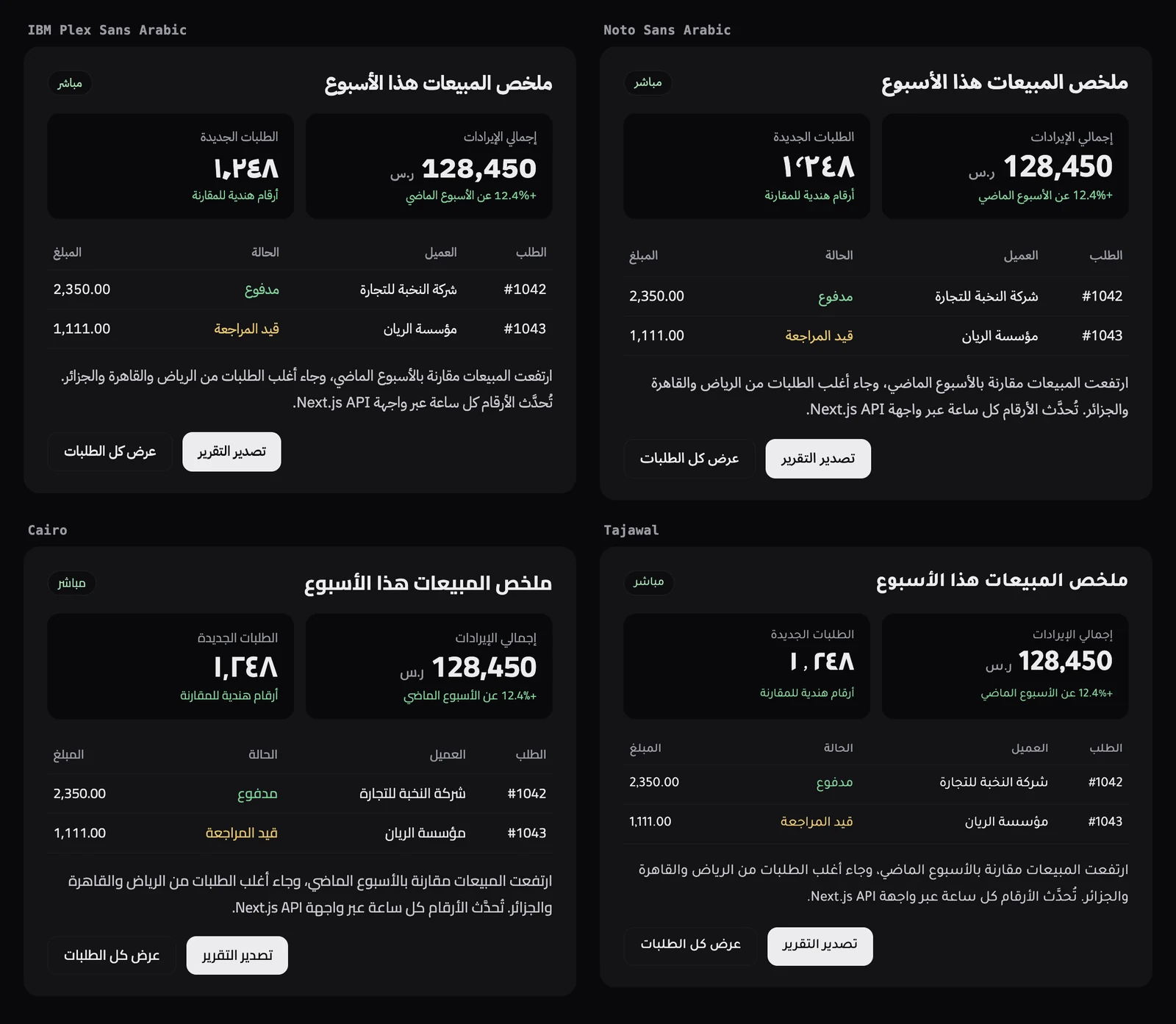
1. IBM Plex Sans Arabic
Suits: dashboards, admin panels, tables, forms. It was the narrowest of the sans fonts in our test: the same sentence was about 20% narrower than in Alexandria, so more text fits in a table cell before it wraps. It reads cleanly in 14px table rows, and its default line height (1.5) is close to a Latin UI font.
Weights: 7 static weights, 100 to 700. Not variable, so list only the weights you use. Latin: it includes the Latin of IBM Plex Sans, and pairs well with IBM Plex Sans or Inter. Numerals: Latin digits are tabular by default. Its Arabic-Indic digits are proportional, even with tabular-nums.
2. Noto Sans Arabic
Suits: dashboards and body text. It is Google's plain, unmodulated Arabic, part of the Noto collection that aims to cover every script, so pages that mix languages stay consistent.
Weights: variable, 100 to 900, with a width axis from 62.5 to 100. Latin: pairs with Noto Sans, Inter or DM Sans. Numerals: both Latin and Arabic-Indic digits are tabular by default; only Noto Kufi Arabic matched that among the sans fonts. Watch the default line height: 2.11, the tallest of the 12, so always set your own.
3. Cairo
Suits: headings, landing pages and friendly app UI. Mohamed Gaber built it by extending the Latin family Titillium Web to Arabic, in a Kufi-based style with short ascenders and descenders. Light weights work for body text, heavy weights for headlines.
Weights: variable, 200 to 1000, plus a slant axis (-11 to 11). Latin: its own Latin is Titillium Web, so pair it with Titillium Web or use it alone. Numerals: Latin digits tabular by default, Arabic-Indic digits proportional.
4. Tajawal
Suits: light marketing pages and short UI labels. A low-contrast geometric design by Boutros, and the smallest Arabic file in our test (8.7 KB at weight 400).
Weights: 7 static weights: 200, 300, 400, 500, 700, 800 and 900. There is no 600, so font-semibold falls back to a neighbouring weight. Latin: its own geometric Latin, made to sit next to other Latin fonts. Numerals: proportional only, in both scripts. Avoid it for columns of numbers.
The next four:
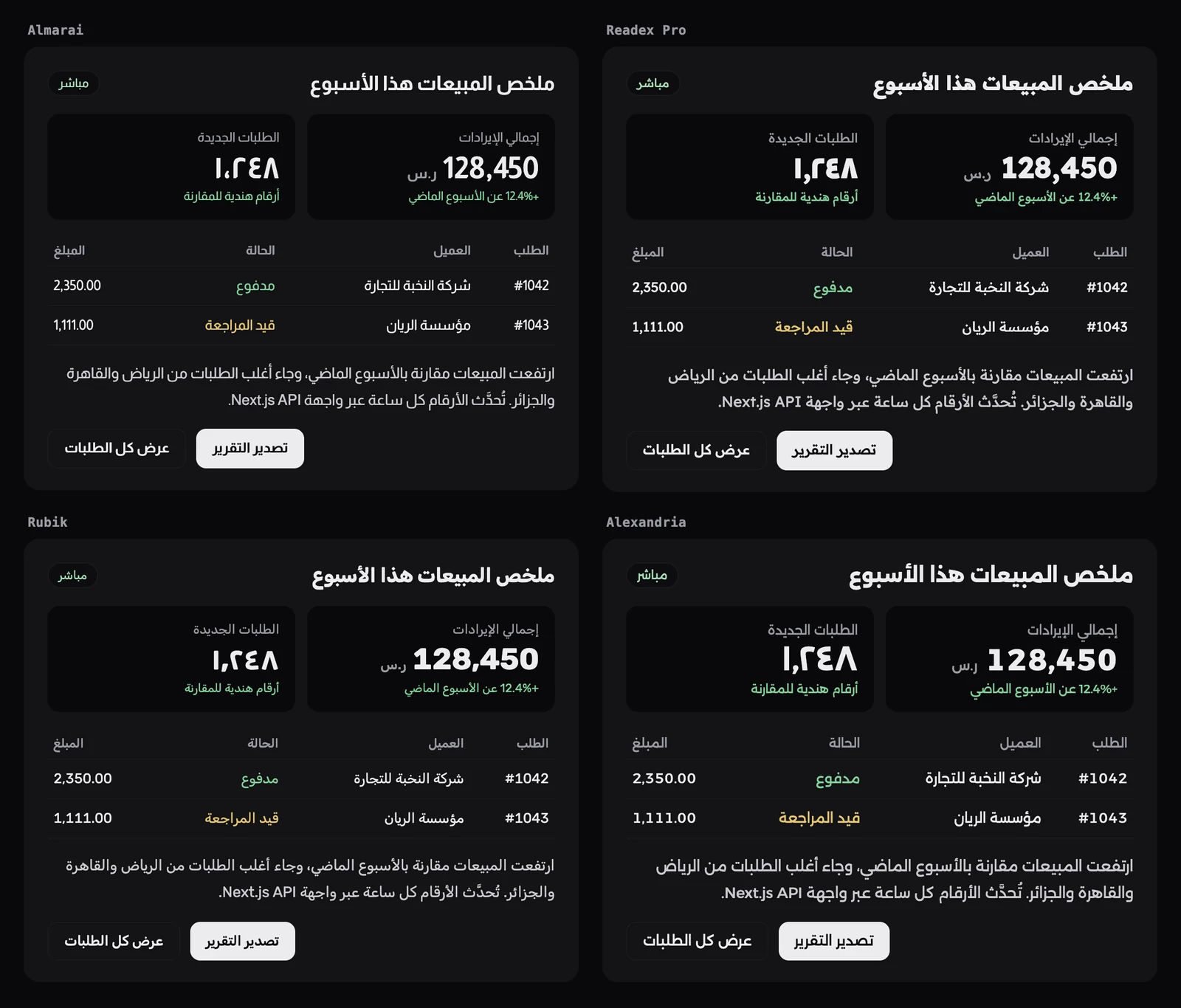
5. Almarai
Suits: headings and simple, airy interfaces. Boutros drew it for screen reading, with low contrast and wide openings. Our SaaS template uses it for Arabic headings.
Weights: 4 static weights: 300, 400, 700 and 800. No medium, so plan your hierarchy with regular and bold. Latin: its own sans Latin. Numerals: proportional only. Its default line height is the tightest of the 12 (1.11), which can make diacritics touch the line above if you leave it unset.
6. Readex Pro
Suits: body text where reading ease matters, such as help pages and onboarding. Nadine Chahine and Thomas Jockin designed it with the method behind Lexend, the Latin family made to reduce visual noise.
Weights: variable, 160 to 700, plus a HEXP axis that widens the letters. Latin: Lexend is the natural partner. Numerals: proportional only, so keep it out of data tables.
7. Rubik
Suits: brands that want the slightly rounded look of Rubik in both languages. One family covers Latin, Arabic, Hebrew and Cyrillic.
Weights: variable, 300 to 900, with italics. Latin: built in, so one family does both scripts. Numerals: Latin digits are proportional by default but become tabular with font-variant-numeric: tabular-nums. Arabic-Indic digits stay proportional.
8. Alexandria
Suits: bold headings and hero text. It is the Arabic companion of Montserrat, and the widest font in our test, which suits display sizes but costs space in tables.
Weights: variable, 100 to 900. Latin: pair it with Montserrat. Numerals: Latin digits become tabular with tabular-nums; Arabic-Indic digits stay proportional.
The last four:
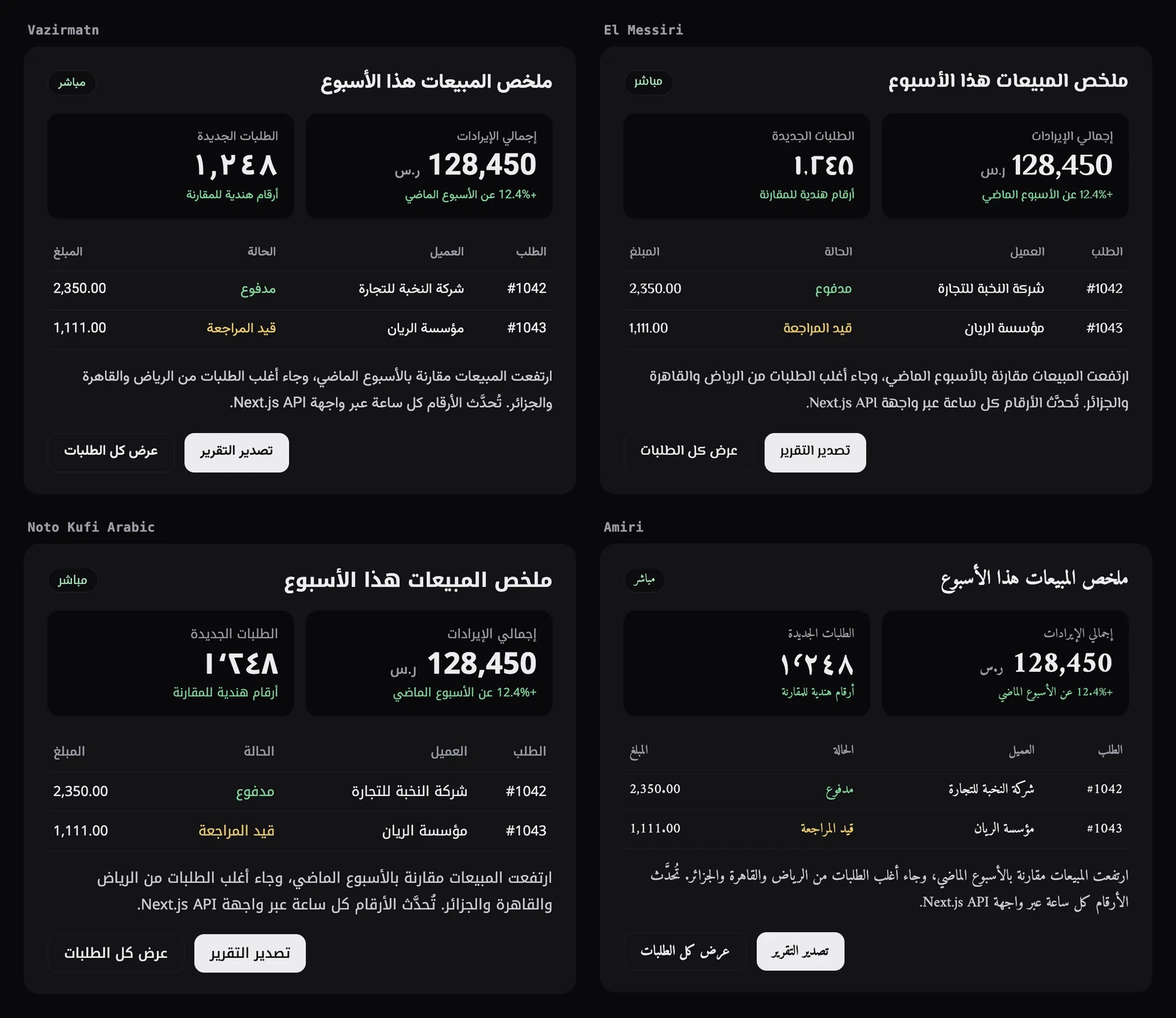
9. Vazirmatn
Suits: app UI, especially products that serve Persian readers too. It started in 2015 as a Persian and Arabic font for web pages and applications.
Weights: variable, 100 to 900. Latin: its Latin is Roboto, so it pairs with Roboto. Numerals: Latin digits tabular by default, and Arabic-Indic digits become tabular with tabular-nums.
10. El Messiri
Suits: headings with character. Its Arabic is curvy, inspired by Naskh drawn with a brush, which gives a page warmth at large sizes.
Weights: variable, 400 to 700. Latin: its Latin and Cyrillic come from Philosopher. Numerals: proportional only, and its Arabic-Indic seven and eight are drawn as rounded U and ∩ shapes, so test it with your real prices before using it near numbers.
11. Noto Kufi Arabic
Suits: headings and large text. Google describes it as a simplified Kufi mainly for larger sizes, and it pairs naturally with Noto Sans Arabic for body text.
Weights: variable, 100 to 900. Latin: pairs with Noto Sans or Inter. Numerals: Latin and Arabic-Indic digits are tabular by default, like Noto Sans Arabic.
12. Amiri
Suits: long reading text only: articles, documentation, legal pages, religious or literary text. It is a classical Naskh revived from the Bulaq Press type of early 20th century Cairo. At small UI sizes it looks cramped, as the table and buttons in the card show.
Weights: 400 and 700, with italics. Latin: it has a serif Latin, so pair it with a Latin serif. Numerals: both digit sets tabular by default. Two warnings: it renders smaller than the sans fonts (the same sentence was 12% narrower than in IBM Plex Sans Arabic), so set it about 2px larger, and its Arabic file is the heaviest here at 105.9 KB per weight.
Which Arabic fonts have tabular numbers?
For a dashboard, check the digits before anything else. A column of prices only lines up when every digit has the same width. Six of the 12 fonts do this by default for Latin digits, two more do it with font-variant-numeric: tabular-nums, and four never do.
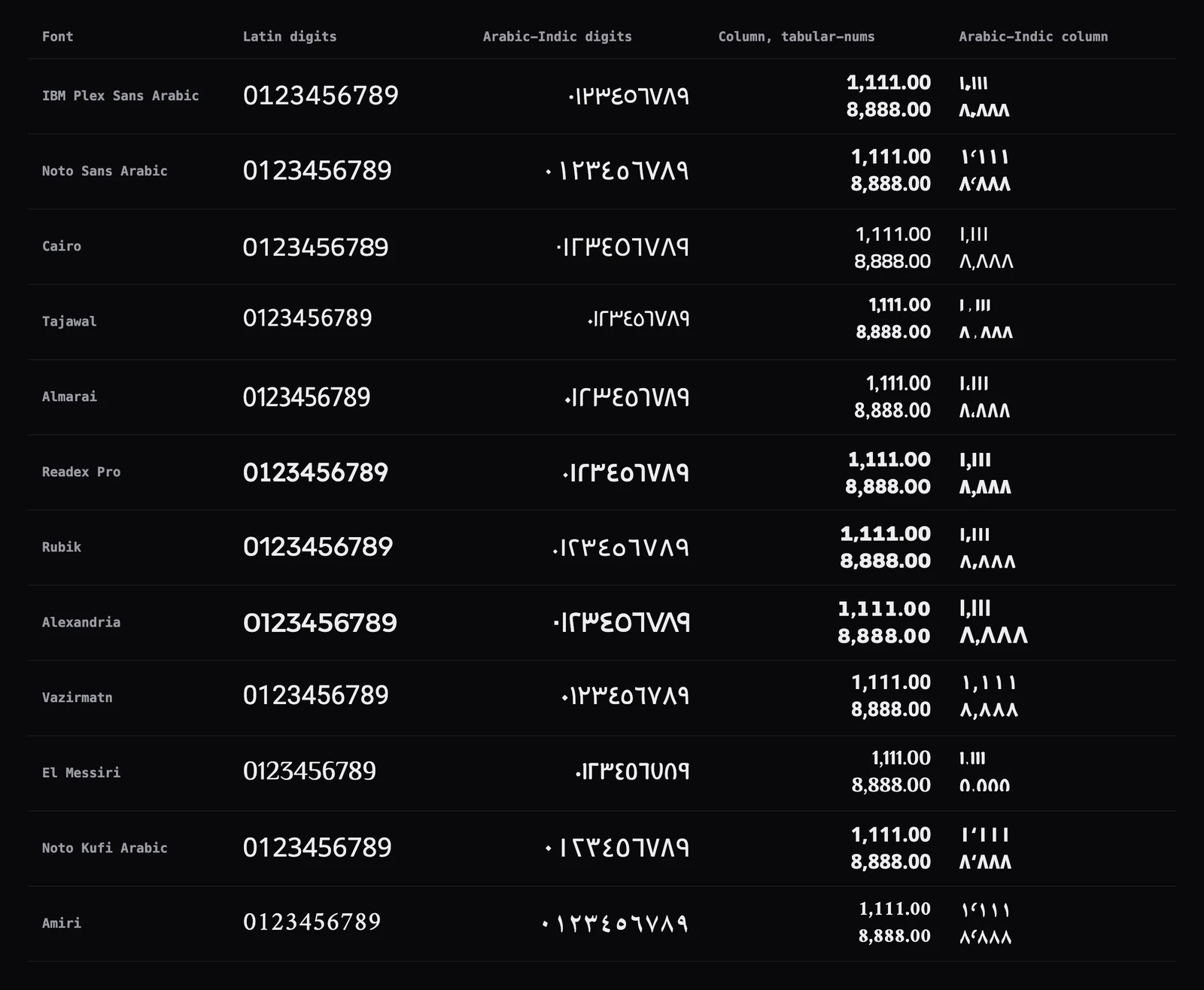
- Tabular Latin digits by default: IBM Plex Sans Arabic, Noto Sans Arabic, Cairo, Vazirmatn, Noto Kufi Arabic, Amiri.
- Tabular with
tabular-nums: Rubik, Alexandria. - Proportional only: Tajawal, Almarai, Readex Pro, El Messiri. In the image, their "1,111.00" is visibly shorter than "8,888.00".
- Tabular Arabic-Indic digits: Noto Sans Arabic, Noto Kufi Arabic and Amiri by default, Vazirmatn with
tabular-nums.
Add tabular-nums (Tailwind's tabular-nums class) to every table cell, KPI and price anyway. It costs nothing in fonts that are already tabular and fixes Rubik and Alexandria.
Which digits to show is a separate choice. Many Arabic products use Latin digits (0 to 9) throughout, while the Saudi and Egyptian locales default to Arabic-Indic digits (٠ to ٩). The locale decides when you format with Intl.NumberFormat: in Chrome 156 and Node.js 24, "ar" and "ar-AE" give 1,248.5, "ar-SA" and "ar-EG" give ١٬٢٤٨٫٥, and "ar-DZ" gives 1.248,5. Add -u-nu-latn to the locale ("ar-SA-u-nu-latn") to force Latin digits.
How to load an Arabic font in Next.js with next/font
Load one font per script, give each a CSS variable, and switch the family by language in CSS. next/font/google downloads the files at build time and serves them from your own domain, so the browser sends no request to Google. We built the code below on Next.js 16.4.5 and checked the HTML and CSS it produced.
// app/fonts.ts
import { Inter, IBM_Plex_Sans_Arabic } from "next/font/google";

// Latin: a variable font, so no weight list is needed.
export const inter = Inter({
  subsets: ["latin"],
  display: "swap",
  variable: "--font-latin",
});

// Arabic: a static font, so list only the weights the UI uses.
export const plexArabic = IBM_Plex_Sans_Arabic({
  subsets: ["arabic"],
  weight: ["400", "500", "700"],
  display: "swap",
  variable: "--font-arabic",
  preload: false,
});
// app/[locale]/layout.tsx
import { inter, plexArabic } from "../fonts";
import "../globals.css";
export default async function LocaleLayout({
children,
params,
}: {
children: React.ReactNode;
params: Promise<{ locale: string }>;
}) {
const { locale } = await params;
return (
<html
lang={locale}
dir={locale === "ar" ? "rtl" : "ltr"}
className={`${inter.variable} ${plexArabic.variable}`}
>
<body>{children}</body>
</html>
);
}/* app/globals.css */
html {
font-family: var(--font-latin), system-ui, sans-serif;
}
/* Arabic first, Latin second: Latin words inside Arabic text use Inter */
html[lang="ar"] {
font-family: var(--font-arabic), var(--font-latin), system-ui, sans-serif;
}What each option does, and what we saw in the build:
subsets: ["arabic"]: names the subset to preload. The generated CSS still holds the other subsets, each behind aunicode-range, so the browser downloads a file only when the page has characters in that range.weight: required for static fonts such as IBM Plex Sans Arabic, Tajawal, Almarai and Amiri. Variable fonts (Noto Sans Arabic, Cairo, Alexandria and the rest) need no weight: one file covers the whole range.display: "swap": the default innext/font, written here so it is visible. Text shows at once in a fallback font, then swaps.variable: creates--font-arabic, which you use in CSS or in Tailwind's@theme.preload: false: with the default (true), our English page preloaded 4 font files, 3 of them the Arabic weights, about 101 KB that an English reader never uses. Withpreload: falseon the Arabic font, both pages preload only Inter, and Arabic pages still load the Arabic files as soon as Arabic text renders. Keep the default if most of your visitors read Arabic.
Variable is not always lighter. The three static IBM Plex Sans Arabic weights came to about 101 KB together, while the single variable Noto Sans Arabic file (Arabic subset, weight axis only) was 162 KB. A variable font pays off when you use four or more weights, or animate the weight.
next/font also writes a fallback face built from Arial with adjusted metrics (for IBM Plex Sans Arabic it set size-adjust: 101.17%), which keeps the layout from jumping when the real font arrives. To self-host files instead, next/font/local takes a src path and a declarations list for the unicode-range; our real estate, vacation rental and event ticketing templates do this, so their builds need no network.
For the right-to-left layout itself (logical properties, the rtl: variant, what must not flip), see the Tailwind CSS RTL guide.
Line height, letter spacing and font size for Arabic
Set an explicit line height, keep letter spacing at 0, and do not shrink Arabic below the size you use for English. Here is why, with numbers from the test.
Line height
line-height: normal means "whatever the font file says", and Arabic fonts disagree wildly. Measured in Chrome at 100px, one Arabic line was:
- 1.11 in Almarai, 1.18 in Rubik, 1.20 in Tajawal, 1.22 in Alexandria and 1.25 in Readex Pro
- 1.50 in IBM Plex Sans Arabic, 1.56 in El Messiri, 1.57 in Vazirmatn and 1.75 in Amiri
- 1.87 in Cairo, 1.90 in Noto Kufi Arabic and 2.11 in Noto Sans Arabic
Switching from Almarai to Noto Sans Arabic with normal would almost double the height of every line. With explicit values (1.5 for headings, 1.8 for the paragraph, 1.5 in table rows), all 12 cards in our test came out between 448px and 460px tall. A good starting point: 1.7 to 1.8 for Arabic body text, 1.3 to 1.4 for Arabic headings, and never the 1.1 that Latin display headings often use, because Arabic diacritics sit above and below the letters and get clipped.
Letter spacing
Keep it at 0. Arabic letters connect, and MDN warns that letter spacing on a connected script can make the text look broken. Reset any tracking you inherit from Latin styles: html[lang="ar"] { letter-spacing: 0; }, or rtl:tracking-normal in Tailwind. Arabic also has no capital letters, so an uppercase eyebrow label needs weight or colour to stand out instead.
Font size
The same Arabic sentence at the same font size was 1,479px wide in IBM Plex Sans Arabic, 1,628px in Noto Sans Arabic, 1,841px in Alexandria and only 1,297px in Amiri. Two practical rules follow. Size Arabic by eye, not by copying the English value: Amiri and other Naskh fonts need about 2px more. And check table columns in Arabic after a font change, because a wider font like Alexandria wraps cells that fit in English. In our card, 14px table text was readable in every sans font; we would not go below that for Arabic UI text.
Which Arabic fonts Aniq UI's templates use
Our dashboards are split between IBM Plex Sans Arabic and Noto Sans Arabic, and most of our websites use Noto Sans Arabic. We checked the next/font calls and stylesheets in each template's repository:
| Template | Arabic font | Latin font |
|---|---|---|
| AI admin dashboard | IBM Plex Sans Arabic | System font stack |
| Fitness dashboard | IBM Plex Sans Arabic | Inter |
| Financial dashboard | Noto Sans Arabic | Inter |
| LMS (student website and admin) | IBM Plex Sans Arabic | Inter |
| Restaurant (website and admin) | IBM Plex Sans Arabic | Inter, Montserrat for headings |
| E-commerce storefront | Zain, IBM Plex Sans Arabic for the hero | Plus Jakarta Sans |
| Real estate (website and admin) | Noto Sans Arabic, Noto Naskh Arabic for headings | Manrope, Cormorant Garamond |
| Vacation rental (website and admin) | Noto Sans Arabic | Outfit |
| Event ticketing (website and admin) | Noto Sans Arabic, Lalezar for headings | DM Sans, Archivo Black |
| SaaS Template | Noto Sans Arabic, Almarai for headings | DM Sans, Clash Display |
| Free landing page templates | Noto Sans Arabic | Inter |
| Free 3D landing page | Cairo | Anton |
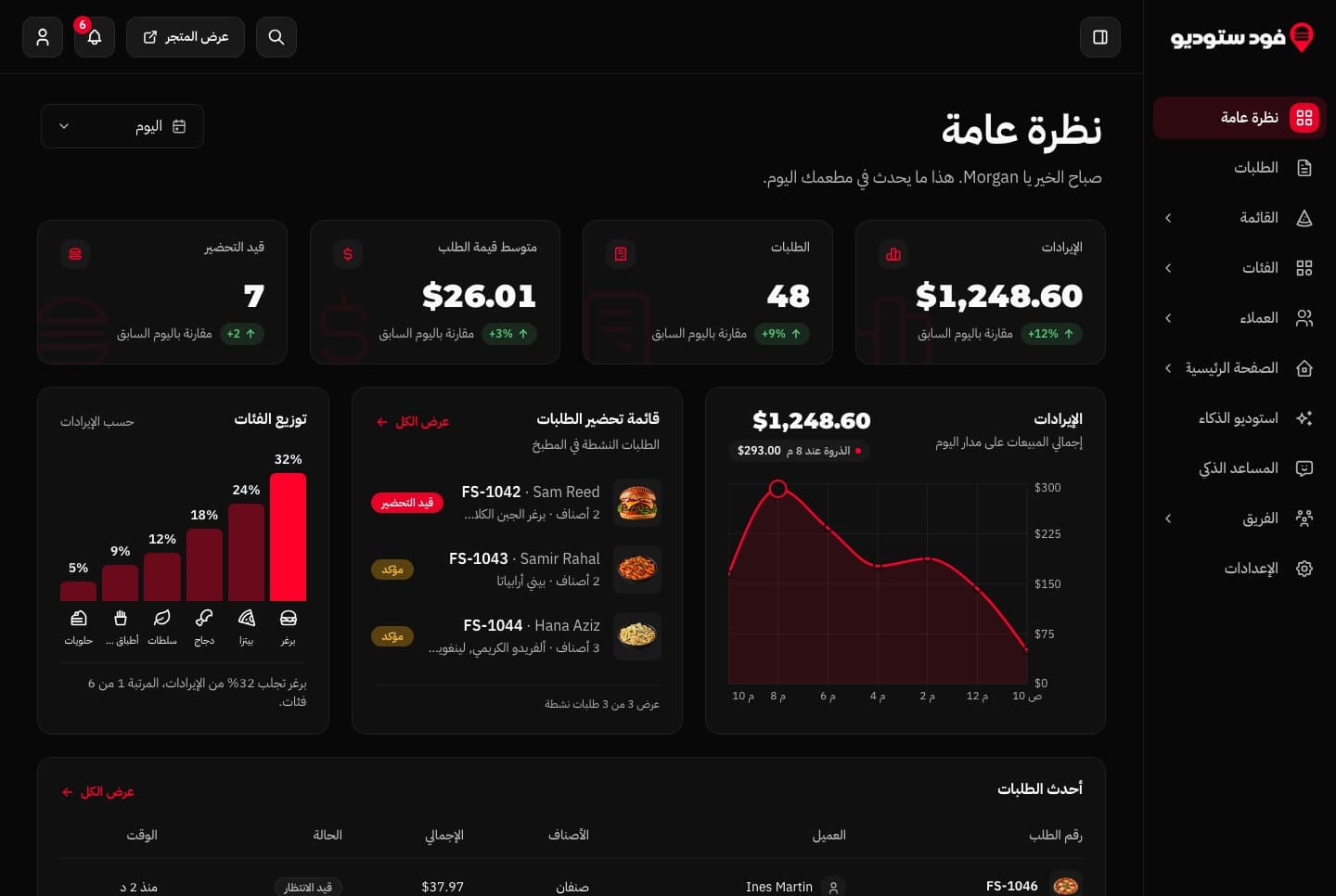
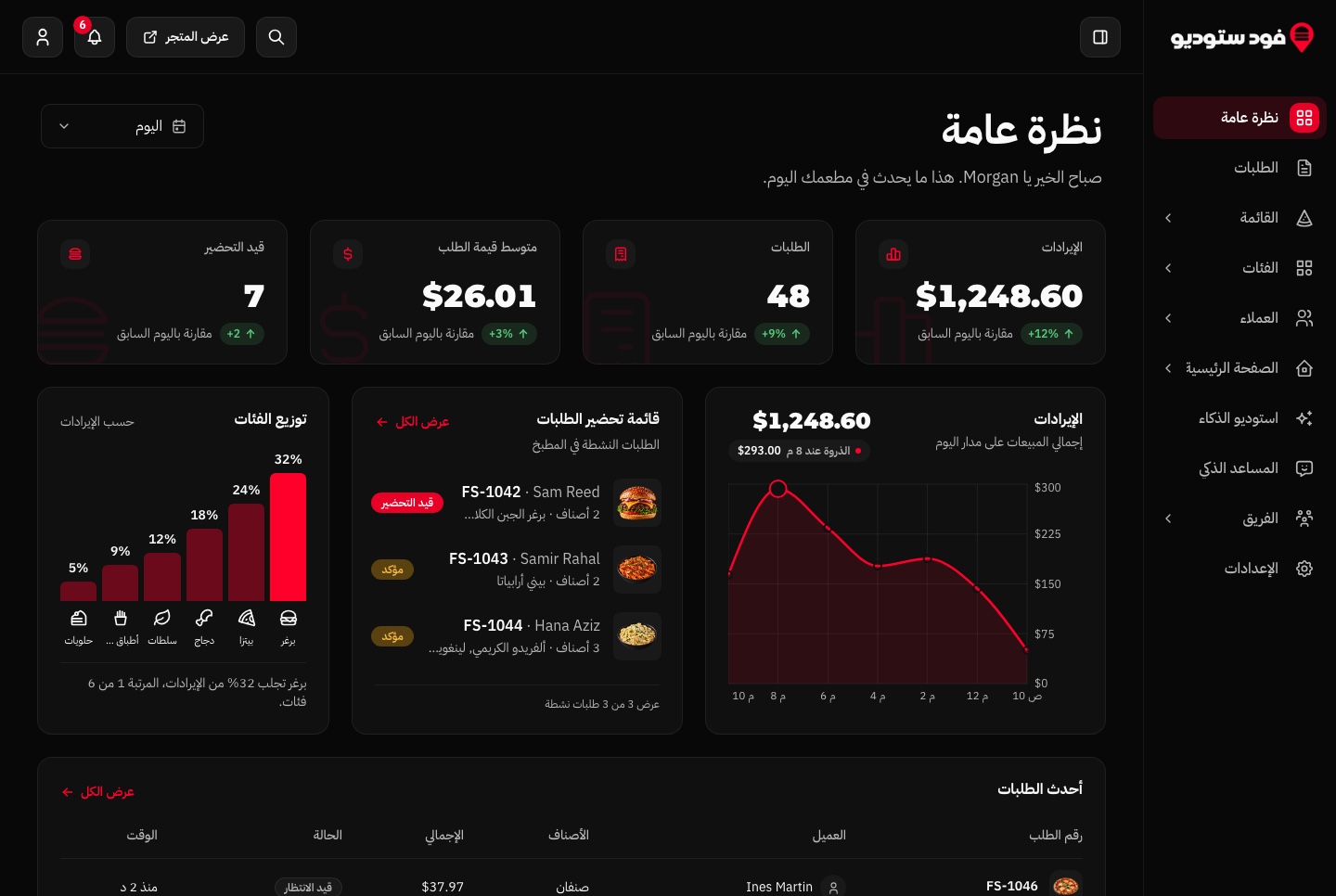
Here is IBM Plex Sans Arabic doing dashboard work in the restaurant template: KPI cards, a chart, an order queue and a table, with Latin prices and order numbers inside Arabic text.
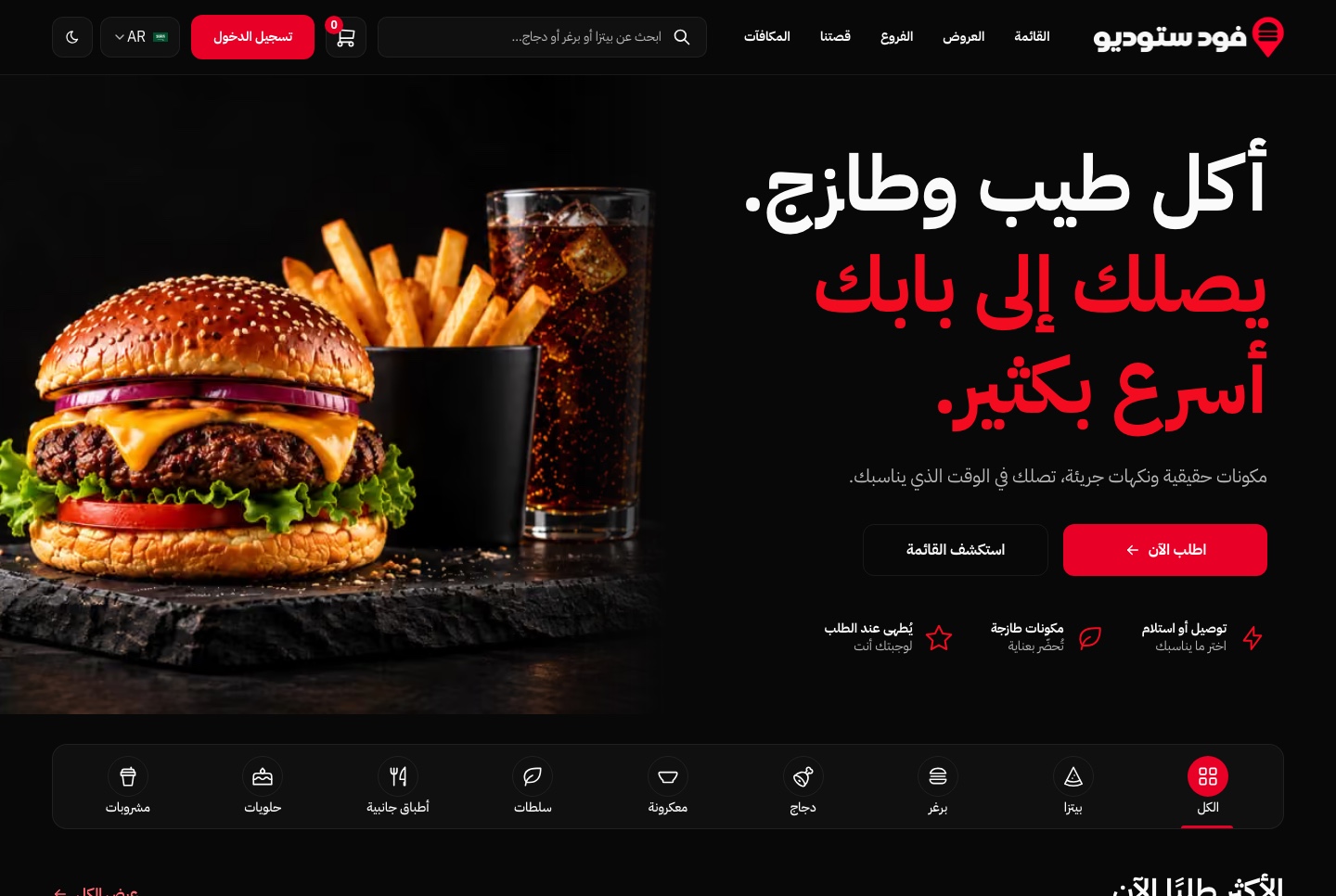
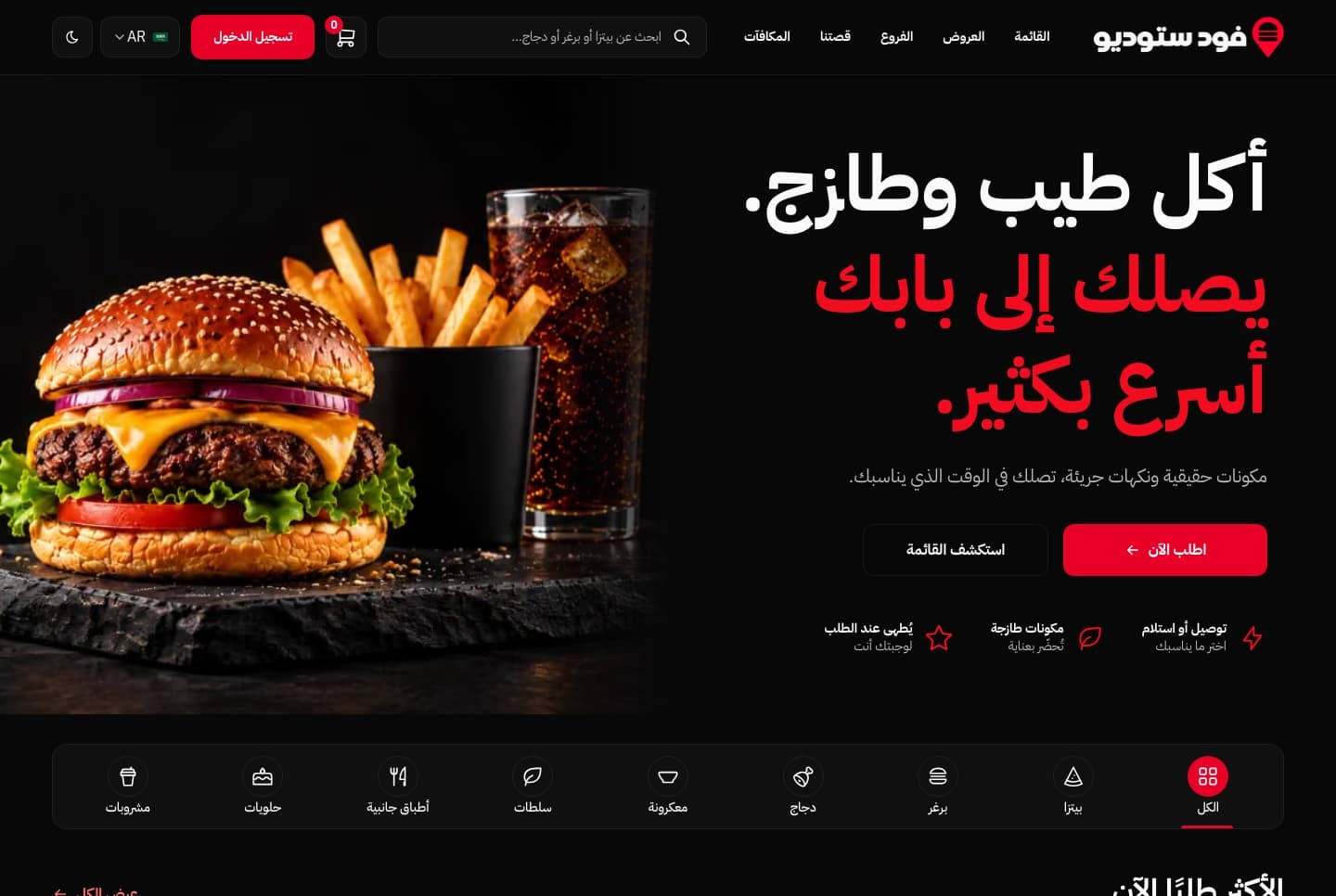
And the same font at headline size on the restaurant website, where the bold weight carries a three-line Arabic hero:
Every one of these demos can be switched to Arabic before you buy. The nine Arabic dashboards are compared here, and if you are building a marketing site, the landing page design guide covers the sections and the Arabic details.
FAQ
What is the best Arabic font for websites?
For interfaces, IBM Plex Sans Arabic or Noto Sans Arabic. Both are clear at small sizes, have tabular Latin digits for tables, and include Latin. For headings, Cairo, Almarai or Noto Kufi Arabic. For long articles, Amiri.
Are Google's Arabic fonts free for commercial use?
Yes. All 12 fonts in this guide are under the SIL Open Font License 1.1, which allows use, embedding and bundling in commercial websites and apps. The one thing it forbids is selling the font files on their own.
Is Cairo good for body text?
In its lighter weights, yes; its designers recommend the light weights for body text and the heavy ones for headlines. For dense dashboards, IBM Plex Sans Arabic fits more text per line.
Can one font handle English and Arabic?
Yes, all 12 include Latin. The most even results come from fonts whose Latin is a known Latin family: IBM Plex Sans Arabic (IBM Plex Sans), Cairo (Titillium Web) and Vazirmatn (Roboto). Many products still pair the Arabic font with a separate Latin font such as Inter, as most of our templates do.
Should I use Arabic-Indic or Latin digits?
Either is correct; pick one per product and format numbers with Intl.NumberFormat. If you use Arabic-Indic digits in tables, choose Noto Sans Arabic, Noto Kufi Arabic, Amiri or Vazirmatn, the fonts whose Arabic-Indic digits line up.
Does letter-spacing work in Arabic?
No. Arabic letters join, and spacing them apart breaks the joins. Keep letter-spacing: 0 for Arabic text and use weight, size or colour for emphasis.
Conclusion
Start with IBM Plex Sans Arabic for a dashboard and Noto Sans Arabic for a site that mixes many scripts. Add one display font for headings if the brand needs it. Then do three things in code: tabular-nums on every number, an explicit line height, and letter-spacing: 0 for Arabic. Load each script with next/font, switch the family under html[lang="ar"], and turn off preloading for whichever script fewer of your visitors read.
Arabic-ready templates with the fonts set up
Every paid Aniq UI template ships in English and Arabic with a real right-to-left layout, live demos you can switch to Arabic, and the font loading described above. Prices, paid once, with the source code:
- Websites and storefronts (restaurant, real estate, LMS, e-commerce, vacation rental, event ticketing): $39.
- Landing pages (SaaS and business): $39.
- Admin dashboards: $49. The AI admin dashboard and the fitness dashboard are $69.
- Full stack (website, dashboard and API together): $149.
- All 10 templates: the bundle, list price $499. Check the page for the current offer.
Browse the templates or compare the Arabic RTL dashboards.
Related guides
- Tailwind CSS RTL Guide: Logical Properties and the rtl: Variant
- Arabic RTL Dashboard Templates for Next.js: 9 Aniq UI Dashboards
- How to Design a Landing Page: Steps and Ready Templates
- How to Launch a SaaS Website in English and Arabic With Next.js
Sources
- Next.js: Font module (next/font) API reference
- Google Fonts: fonts with Arabic support
- google/fonts repository: licence files and descriptions
- SIL Open Font License 1.1
- IBM Plex Sans Arabic, Noto Sans Arabic, Cairo, Tajawal, Almarai, Readex Pro
- Rubik, Alexandria, Vazirmatn, El Messiri, Noto Kufi Arabic, Amiri
- MDN: font-variant-numeric
- MDN: letter-spacing (internationalization concerns)
- MDN: Intl.NumberFormat
Checked November 2026.
You might also like
Tailwind CSS RTL Guide: Logical Properties and the rtl: Variant
Build RTL layouts with Tailwind CSS 4 and next-intl: dir and lang per locale, logical utilities, the rtl: variant, Arabic fonts and a testing checklist.
How to Design a Landing Page: Steps and Ready Templates
Design a landing page that converts: the 7 sections in order, Arabic RTL tips, speed and SEO basics, common mistakes, and ready templates, free or $39.
Fix Next.js 16 proxy.ts: Missing Expected Function Export
Fix the Next.js 16 error "Proxy is missing expected function export name": every cause we reproduced on 16.4.5, the exports that build, and next-intl.
